Nano Banana Review: Great Images, Weak Video (13 Models Tested)
Read my Nano Banana review. I tested 13 image models and AI video, and share real results, pricing, credits, pros and cons, and my verdict.
Introduction
Many creators want one app for AI images and videos. I wanted that
too, so I tested Nano Banana with 13 image models and several videos. Is
it worth it? Which model gives the best image quality per credit? Do the
videos have sound? Why does the model selector show the wrong model? In
short, the images are good, but the videos let me down. This Nano Banana review
shares my real results, the full pricing, the credits each model
uses, and my problems. I used my own account and real test prompts. I also list
what I did not test yet. Read the verdict before you spend a dollar.
Nano
Banana Review Verdict
Nano Banana is good for images and weak for video. I liked the top
image models, which printed all my text lines correctly. But my videos had no
sound, the motion was weak, and the model selector looked wrong. This Nano
Banana review covers only what I tried myself.
My advice is simple. Use it for images, and start with a small
plan. If you need video with sound, compare free AI video generators first.
|
What I liked |
What I did not like |
|
GPT Image 2.5 and 2.6 got all
text right |
No audio in my videos |
|
Nano Banana 2.1 costs only 2
credits |
Model selector showed Seedance
on the Veo 3 page |
|
Seedream 5.5 looked very
realistic |
Images and videos generate
slowly |
|
13 image models in one account |
Free plan images carry a
watermark |
|
4 free credits every day |
Z Image and FLUX.2 broke the
text |
|
MCP and CLI for coding agents |
Video credits cost a lot |
Nano
Banana Pricing and Credits
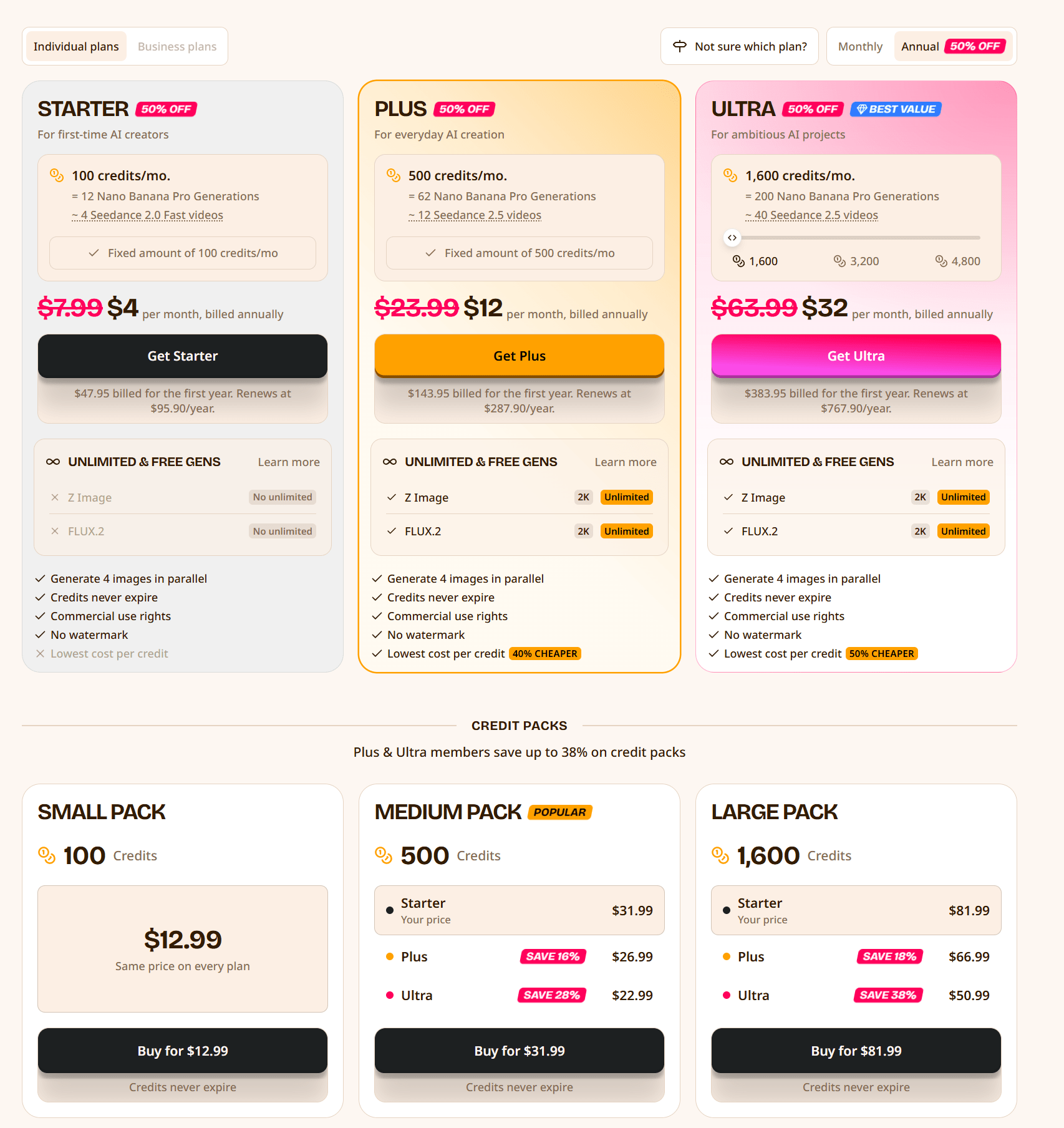
Nano Banana costs $0 to $79.99 per
month. Free users get 4 credits a day, and paid plans start at $9.99 for 100
credits. Each image uses 1 to 10 credits, so credits matter more than the plan
price.
These prices come from the
official pricing page. They can change, so check before
you buy. For other tools, see our AI image generator pricing guide.
|
Plan |
Monthly
price |
Monthly
credits |
|
Free |
$0 |
4 free credits per day |
|
Starter |
$9.99 |
100 |
|
Plus |
$29.99 |
500 |
|
Ultra |
$79.99 |
1,600 |
Prices as listed on the official
page in November 2026.
What
Does the Free Plan Include?
The free plan gives you 4 credits each day after sign-in. They
work only on Z Image and FLUX.2, and they do not expire. Free images carry a
watermark, while the official page says paid plans have none and include
commercial use rights.
How
Many Credits Does Each Image Model Use?
Each image uses 1 to 10 credits in my account. Z Image and FLUX.2
use 1, and Seedream 5 Pro uses 10. The official page lists unlimited 2K Z Image
and FLUX.2 images on Plus and Ultra.
|
Image model |
Credits per image |
|
Z Image |
1 |
|
FLUX.2 |
1 |
|
Nano Banana (original) |
2 |
|
Nano Banana 2.1 |
2 |
|
Seedream 5.5 |
3 |
|
Nano Banana 2 |
4 |
|
GPT Image 2 |
4 |
|
GPT Image 2.5 (Sunburst and Flare) |
4 |
|
GPT Image 2.6 (Sunburst and Flare) |
4 |
|
Nano Banana Pro |
8 |
|
Seedream 5 Pro |
10 |
How
Many Credits Does a Video Use?
Video credits depend on the model, length, and resolution. A
5-second 720p video used 60 credits, and a 15-second one used 90. On Seedance
2.5, a 30-second video used 240 credits at 480p, 540 at 720p, and 1,350 at
1080p.
|
Video |
Resolution |
Credits |
|
5 seconds |
720p |
60 |
|
15 seconds |
720p |
90 |
|
Seedance 2.5, 30 seconds |
480p |
240 |
|
Seedance 2.5, 30 seconds |
720p |
540 |
|
Seedance 2.5, 30 seconds |
1080p |
1,350 |
What
Do Extra Credit Packs Cost?
A 100-credit pack costs $12.99 on
every plan. Bigger packs cost less on higher plans, and the official page says
bought credits never expire.
|
Pack |
Starter |
Plus |
Ultra |
|
100 credits |
$12.99 |
$12.99 |
$12.99 |
|
500 credits |
$31.99 |
$26.99 |
$22.99 |
|
1,600 credits |
$81.99 |
$66.99 |
$50.99 |
What Is Nano Banana?
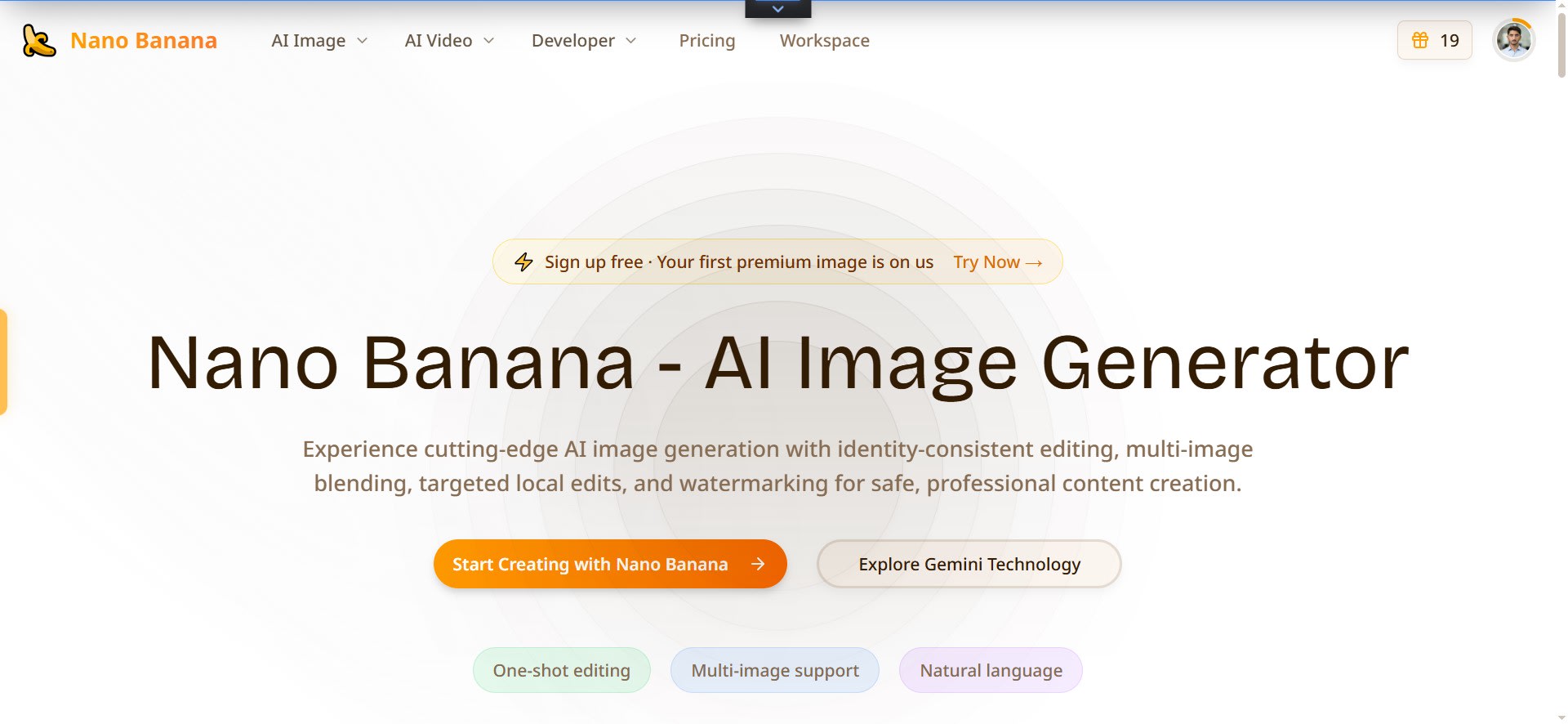
Nano Banana is a multi-model AI platform for images and videos at nanobananana.com. The site
calls itself Nano Banana. Many look-alike sites use similar names, so check the
web address before you sign up.
You pay with credits, and each model uses a different amount. For
more tools like this, see our AI image
tools category.
• Image models: I had 13,
including GPT Image, Seedream, Z Image, FLUX.2, and several Nano Banana
versions.
• Video models: The video
pages list Veo 3, Sora 2 Pro, Seedance 2.0, Seedance 2.0 Fast, and Seedance
2.5.
• Start and end image: You can add a starting image and an ending image to a video.
• Other uses: The site
also lists photo editing, posters, logos, and product photos.
• Coding agents: It has an
MCP server and a CLI.
How I Tested Nano Banana
I tested images and videos in my own account on my Pro plan. For
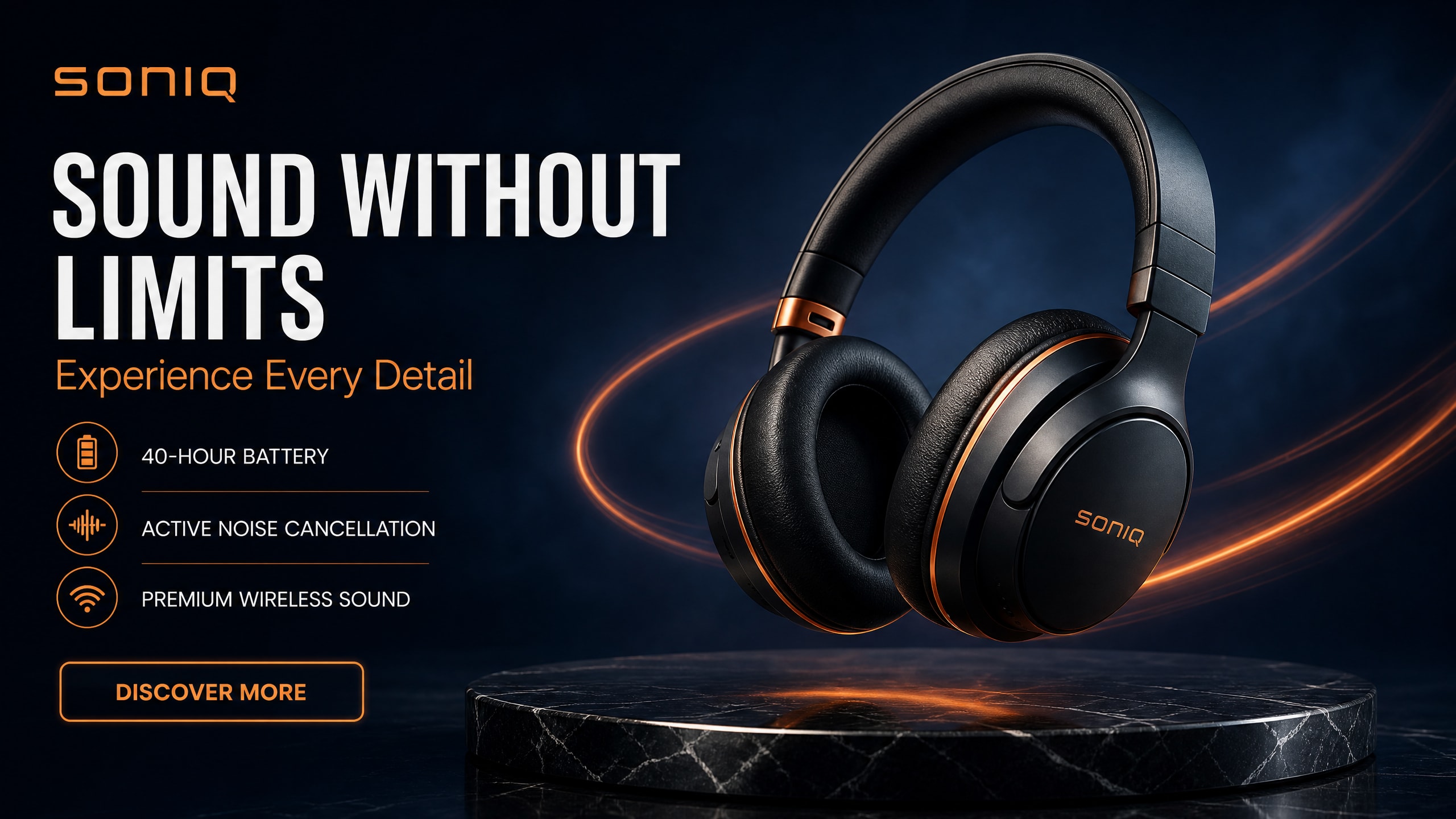
images, I ran one headphone ad prompt on all 13 models at 16:9 and 2K (2736 ×
1536). I checked the text, realism, layout, and extra objects.
For video, I tested Veo 3, Sora 2 Pro, and Seedance by name. I
also ran a start-and-end image test and a single-image test. I did not record
exact generation times, because my internet speed could change them.
Prompt
"Create an ultra-realistic, premium commercial advertisement for a pair of luxury wireless headphones.
Product details:
A pair of matte-black over-ear wireless headphones with elegant metallic orange accents, soft leather ear cushions, realistic materials, and a modern minimalist design.
Scene and composition:
Place the headphones floating slightly above a polished black marble platform. Add subtle orange light trails around the product. The background should be a deep navy-blue professional photography studio with soft atmospheric lighting.
Lighting and realism:
Use cinematic studio lighting, realistic shadows, accurate reflections, detailed material textures, and professional product photography techniques. Every part of the headphones must look physically realistic.
Text requirements:
Include the following exact text in the advertisement:
BRAND: "SONIQ"
HEADLINE: "SOUND WITHOUT LIMITS"
SUBHEADLINE: "Experience Every Detail"
FEATURE 1: "40-HOUR BATTERY"
FEATURE 2: "ACTIVE NOISE CANCELLATION"
FEATURE 3: "PREMIUM WIRELESS SOUND"
CTA: "DISCOVER MORE"
Design requirements:
Use clean, modern typography. Make the headline prominent and all supporting text readable. Maintain excellent spacing and visual hierarchy."
Image
|
Test |
What I did |
What happened |
|
Image test |
Same headphone ad prompt on 13 models |
Most got the text right, but Z Image and FLUX.2 failed |
|
Dialogue video |
Two people talking |
Mouths moved, but no sound came out |
|
Start and end image |
Rainy street to a cozy hug |
Scene jumped, 752 × 560, no audio |
|
Single image |
Lion hugging a kitten |
Consistent look, weak motion, 864 × 496 |
|
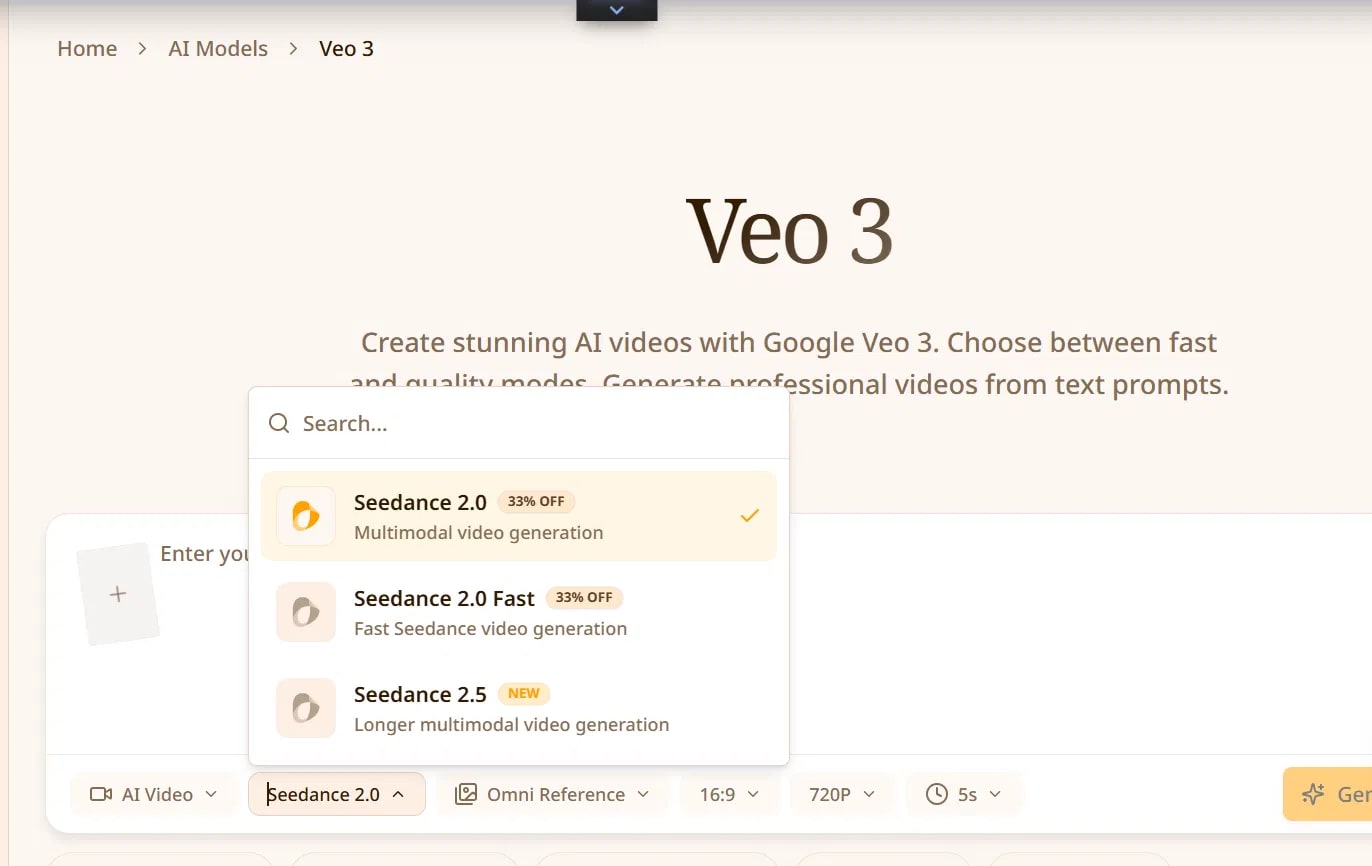
Model selector |
Opened Veo 3, Seedance 2.0, and Sora 2 Pro pages |
Seedance 2.0 showed on all three |
What Worked Well
The top image models worked very well. GPT Image 2.5 and 2.6,
Seedream 5.5, and Nano Banana 2.1 printed all seven text lines correctly. The
headphones looked realistic, with clean orange accents and a marble platform.
The single-image video kept the lion and the kitten consistent,
and the camera moved smoothly with no cuts. I gave that clip 6.5 out of 10,
which is my own score and not a benchmark.
• Text accuracy: Ten of 13
models got the text right, though some changed small details.
• Realism: Seedream 5.5 gave the most realistic headphones to my eye.
• Value: Nano Banana 2.1 used only 2 credits and got every line right.
• Video look: The
characters and clothes stayed the same in the whole clip.
• Daily credits: You get 4
free credits a day for Z Image and FLUX.2.
Which Nano Banana Image Model Is Best?
GPT Image 2.5
and 2.6 gave the best quality, and Nano Banana 2.1 gave the best value. All
four GPT Image versions got every line right. Seedream 5.5 and Nano Banana 2.1
did the same at lower credit costs.
The ratings below
are my own view, not a benchmark. The cheapest models broke the text, and
paying more did not always help.
|
Model |
Credits |
Text
result |
My verdict |
|
GPT Image
2.6 Sunburst |
4 |
All 7 lines
correct |
Excellent |
|
GPT Image
2.6 Flare |
4 |
All 7 lines
correct |
Excellent |
|
GPT Image
2.5 Sunburst |
4 |
All 7 lines
correct |
Excellent |
|
GPT Image
2.5 Flare |
4 |
All 7 lines
correct |
Excellent |
|
Seedream
5.5 |
3 |
All 7 lines
correct |
Excellent,
good value |
|
Nano Banana
2.1 |
2 |
All 7 lines
correct |
Good, best
value |
|
GPT Image 2 |
4 |
Correct,
but brand in lowercase |
Good |
|
Seedream 5
Pro |
10 |
Correct,
but added a logo icon |
Good, but
costly |
|
Nano Banana
Pro |
8 |
Correct,
brand in beige |
Fair for
the price |
|
Nano Banana
2 |
4 |
Correct,
but not true 16:9 |
Ratio
problem |
|
Nano Banana
(original) |
2 |
“CANCELATION”
misspelled |
Weak |
|
Z Image |
1 |
Garbled
text, extra objects |
Failed |
|
FLUX.2 |
1 |
Garbled
text, extra words |
Failed |
Which Model Has the Best Quality?
GPT Image 2.5 and 2.6 (Sunburst
and Flare) have the best quality in my test. All four printed every line
correctly. The layouts were clean, and each used 4 credits. To compare similar
models, read our GPT Image 2 vs Nano Banana Pro guide.
Which Model Is the Best Value?
Nano Banana 2.1 and Seedream 5.5
are the best value. Nano Banana 2.1 used 2 credits and got every line right.
Seedream 5.5 used 3 credits and looked very realistic. You can also read how Ideogram V4 compares with Nano
Banana 2 on text.
Which Models Should You Skip?
Skip Z Image and FLUX.2 for
text-heavy ads. Both broke the text, and both failed several times before they
worked. Z Image also added extra objects. Original Nano Banana misspelled
“CANCELATION,” and Nano Banana 2 missed the 16:9 shape. See FLUX.2 vs Midjourney for more on FLUX.2.
Are the Expensive Models Worth It?
No, not for this prompt. Seedream
5 Pro used 10 credits, and Nano Banana Pro used 8. Both got the text right, but
I saw no clear jump over the 3 and 4 credit models. Compare them in Nano Banana Pro vs Nano Banana 2.
Can Nano Banana Make Good AI Videos?
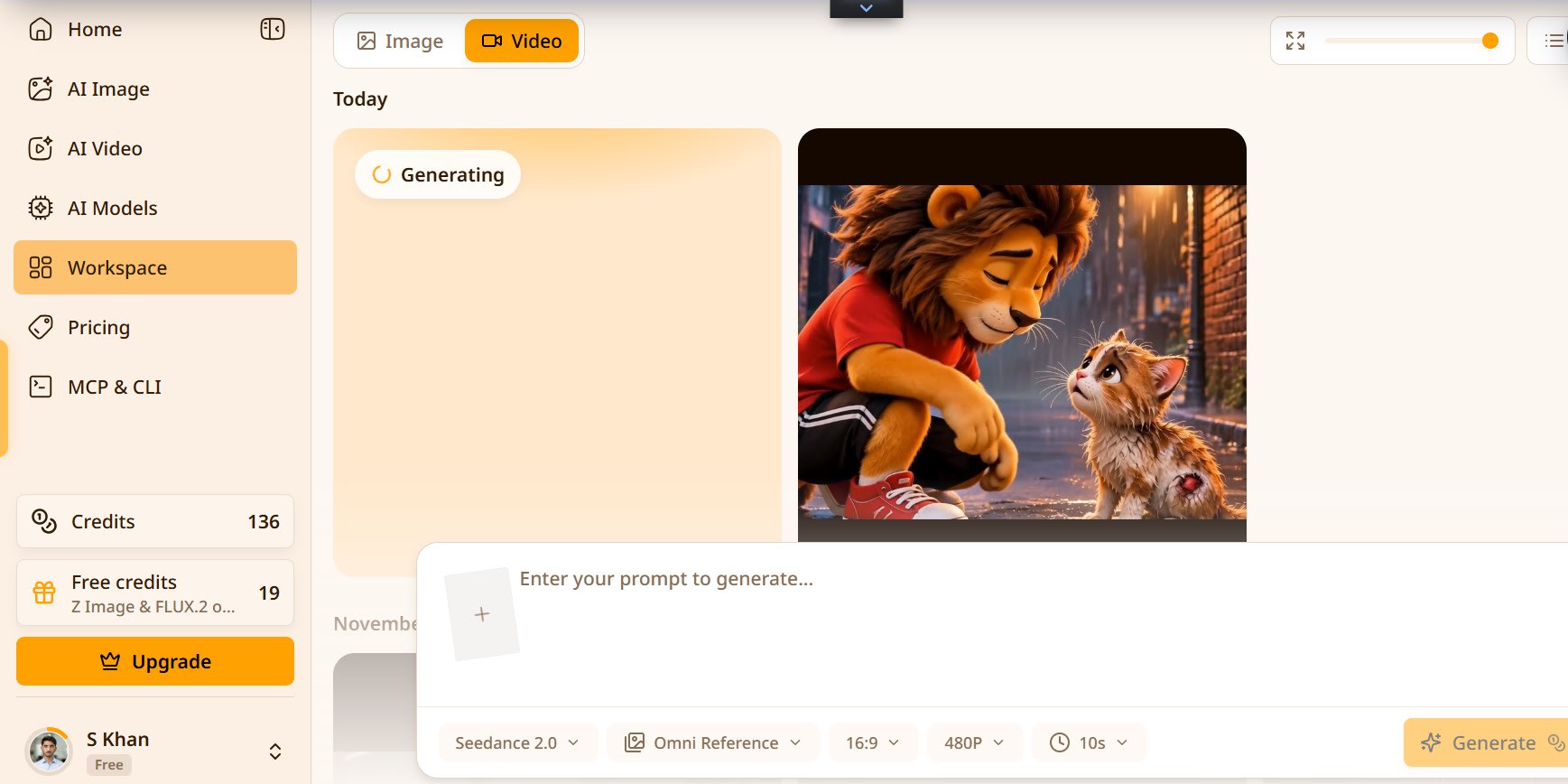
No, not in my
tests. None of my videos had audio, the motion was weak, and the two clips I
checked were below 720p. I tested three video models by name and two
image-to-video tests.
Video length
depends on the model. Seedance 2.0 and Seedance 2.0 Fast let you pick any
length from 1 to 15 seconds. Seedance 2.5 lets you pick any length from 1 to 30
seconds.
Does Nano Banana Video Have Audio?
No, none of my test videos had an
audio track. In a two-person dialogue test, the people moved their mouths, but
no sound came out. A technical check of my earlier MP4 files also found no
audio. I cannot say that no model on the platform can make sound.
How Did the Start and End Image Test Go?
It went
poorly. I gave a rainy street as the start image and a cozy hug as the end
image. The 10-second clip ran at 24 FPS and 752 × 560, which is not 16:9. The
scene jumped from street to room, and the middle of the story was missing.
How Did the Single Image Test Go?
It went better, and I gave it 6.5
out of 10. The lion and the kitten stayed consistent, the camera pushed in
smoothly, and there were no cuts. But breathing, mane, blinking, and lights
barely moved. The clip was 864 × 496 pixels.
For other video tools, see Veo 3 vs Kling AI and our AI video tools category.
Does the Nano Banana Model Selector Work
Correctly?
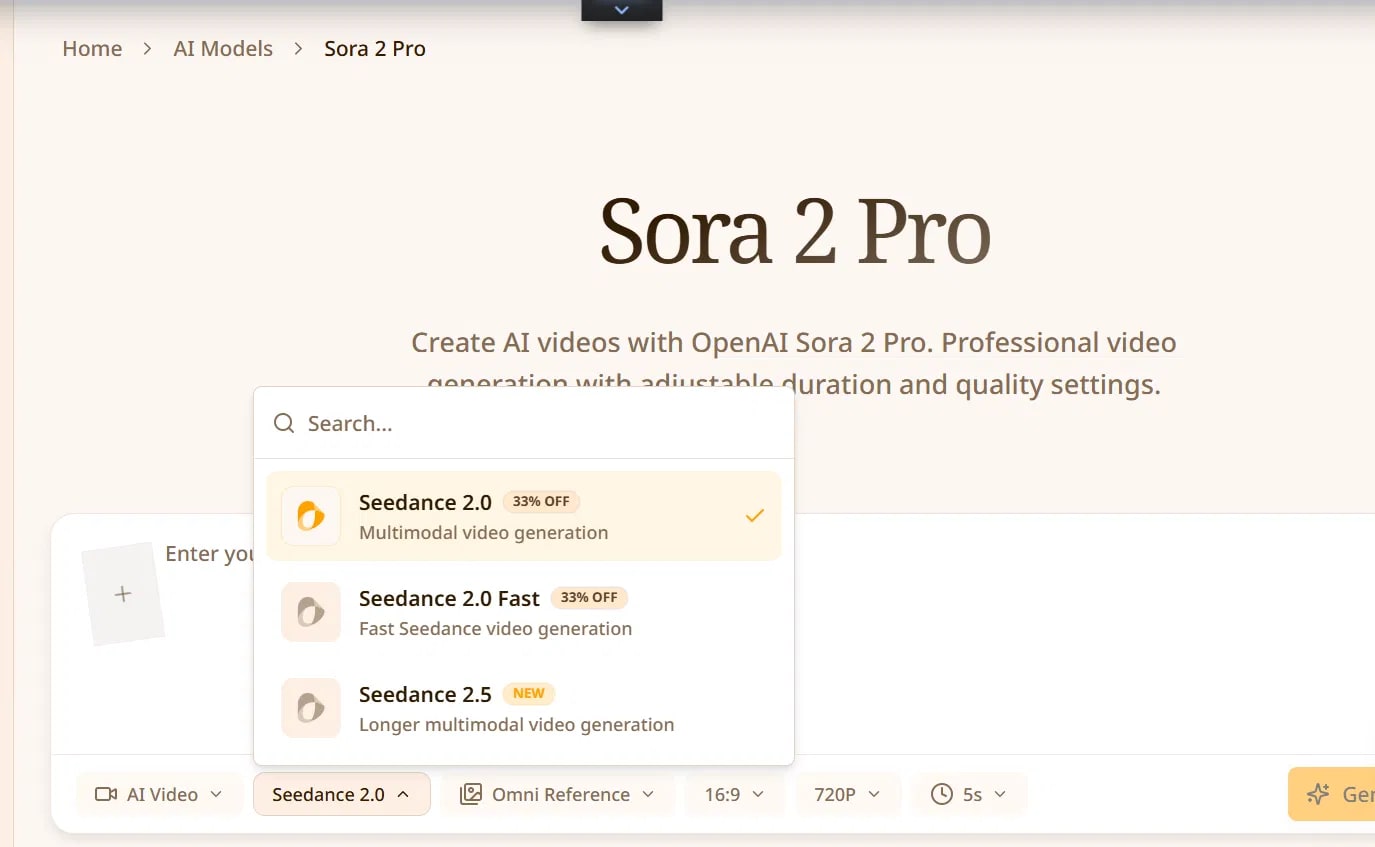
No, it looked
wrong in my test. On the Veo 3, Seedance 2.0, and Sora 2 Pro pages, the
selector in the prompt box showed Seedance 2.0. The list held only Seedance
models. The Veo 3 page also mentioned fast and quality modes, but I saw no such
option.
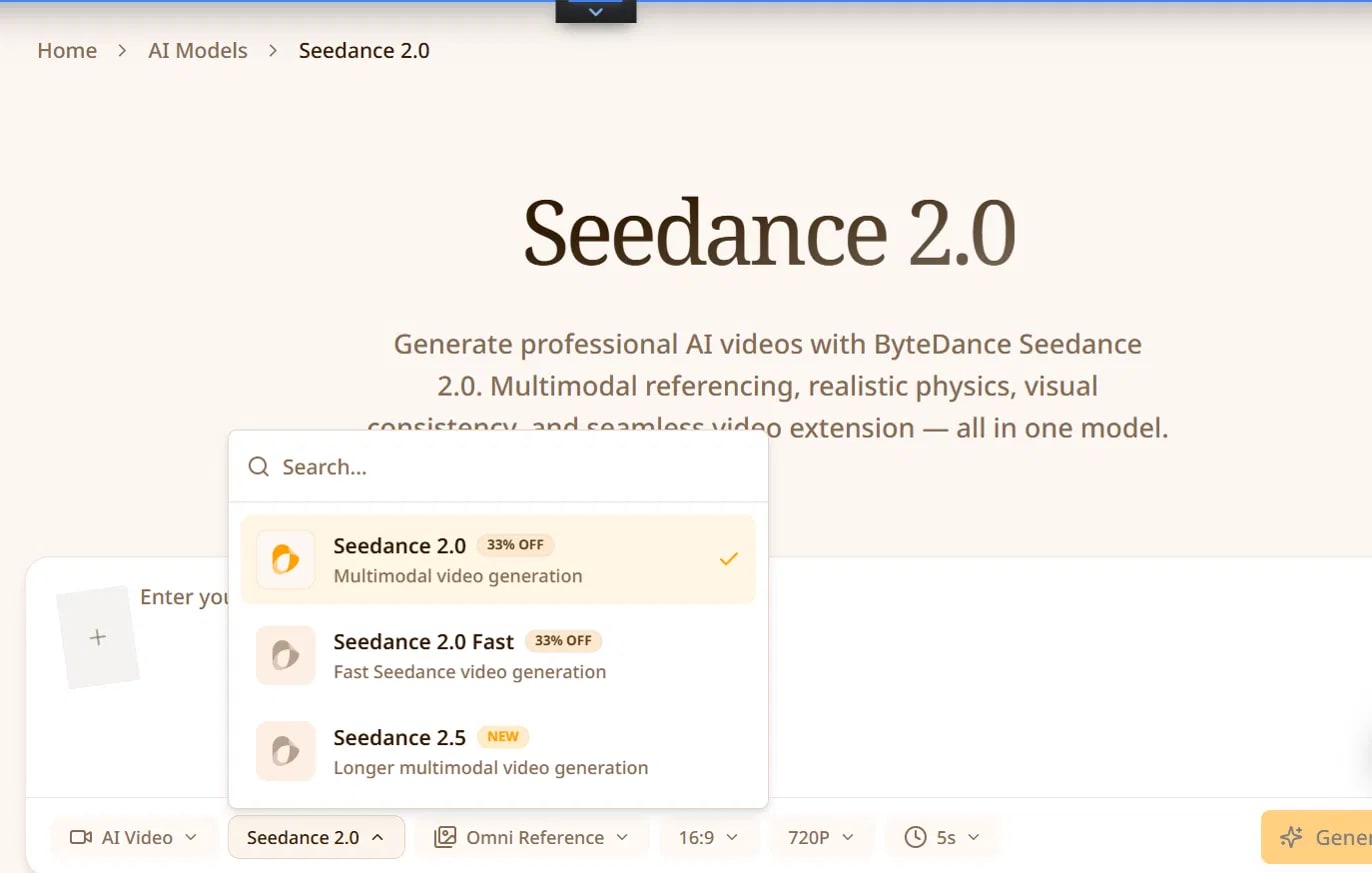
All three videos used the same credits. That makes me suspect a label or selection problem, but I could not confirm which model ran. A video history page that names the model would settle it. Check this before you pay for video.
Nano Banana MCP and CLI Features
Nano Banana has its own MCP server
and CLI. You can connect it to coding agents like Claude Code, Cursor, and
Codex. The agent can then make images and videos, list models, check settings,
check costs, and fetch files. A remote MCP option also exists.
It uses your existing account and
credits, with no separate API billing. A cost tool called nano_estimate_cost
shows credits before you generate. The platform also supports several
languages. For another tool with a custom MCP server, see my Strawberry Browser review.
Problems I Faced
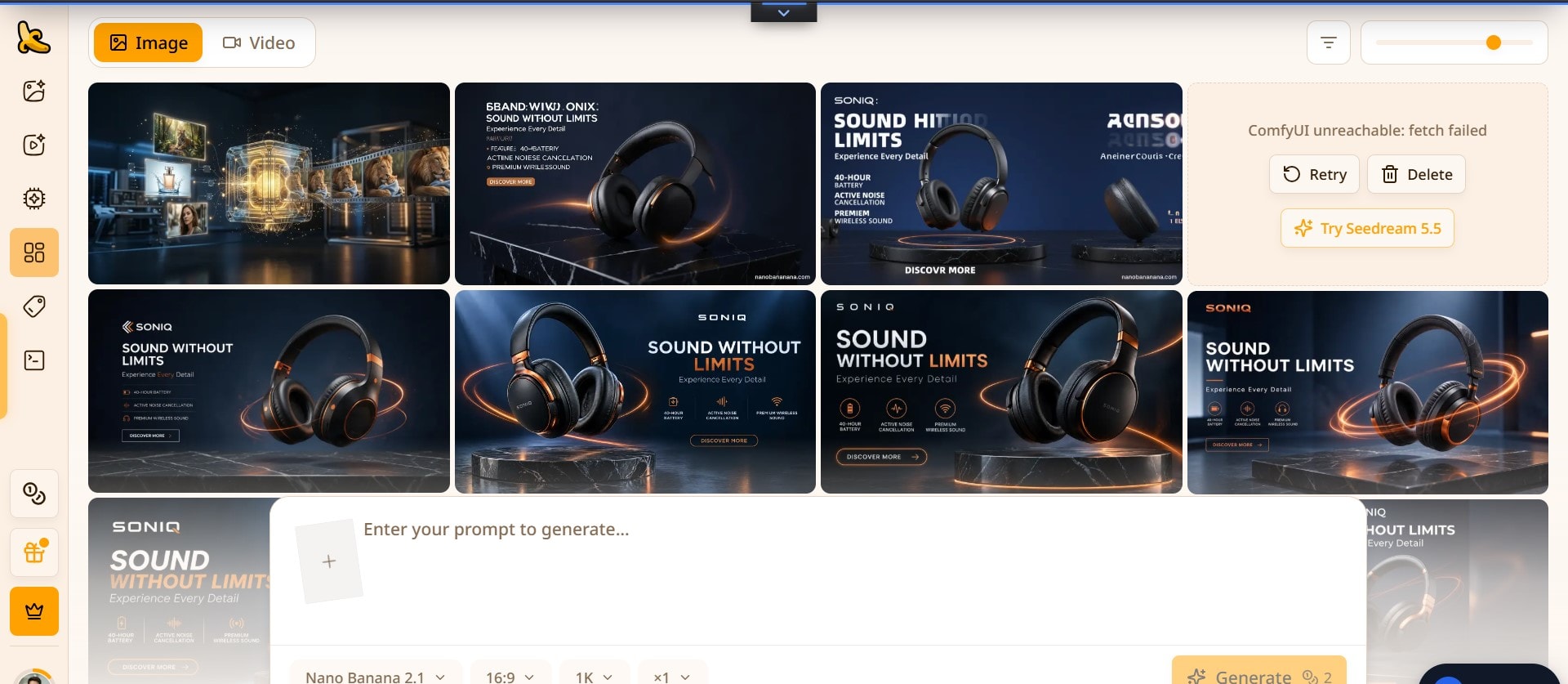
I faced six clear problems, and most came from video. The image
problems came mainly from the cheapest models.
•
No audio: None of my test videos had sound.
• Slow generation: Both images
and videos generated slowly in my tests. My internet may play a part, but the
speed was not fast.
• Failed runs: Z Image and
FLUX.2 failed several times before they worked.
• Watermark: Free trial images carry one. My Z Image and FLUX.2 results also
showed a nanobananana.com mark.
• Model selector: Seedance 2.0
showed on the Veo 3 and Sora 2 Pro pages.
•
One image at a time: On my Pro plan, I could make only one image at once. The pricing
page lists four images at once on paid plans, but my account did not offer it.
What I Have Not Tested Yet
I did not test everything, and I want to be honest about it. I
will update this review when I test more.
•
MCP and CLI with a coding agent
•
Image editing and photo retouching
•
Other prompts, like faces, hands, and images without text
•
A blog cover style prompt on every model
•
Other ratios and sizes, like 1:1, 9:16, and 4K
•
Credit packs and a plan upgrade
Who Should Use Nano Banana?
Nano Banana suits creators who need images for blog covers, ads,
or product shots. Pick GPT Image 2.6, GPT Image 2.5, Seedream 5.5, or Nano
Banana 2.1. Avoid the 1-credit models for text-heavy work. This Nano Banana
review fits that use best.
Skip it if you need video with sound or steady results. Start with
the cheapest plan or a small credit pack, and run your own prompt first. For
video, read my Klap AI
review and the Creatify AI review.
Pros and Cons
Here is a quick look at the good and bad sides. Everything below
comes from my own tests.
Pros
•
Strong image models: GPT Image
2.5, GPT Image 2.6, and Seedream 5.5 got every text line right.
• Good value: Nano Banana 2.1 costs 2 credits, and Seedream 5.5 costs 3.
• Many models: I had 13
image models and several video models in one account.
•
Daily free credits: You get 4 a
day for Z Image and FLUX.2.
•
Flexible video length: Seedance 2.5
lets you pick 1 to 30 seconds.
•
Start and end image: You can
guide a video with two images.
•
MCP and CLI: The platform
lists support for coding agents.
•
Consistent characters: The lion and
kitten kept the same look in the video.
Cons
•
No audio: None of my test videos had sound.
•
Weak motion: Clips looked
like animated photos.
•
Low resolution: The two
clips I checked were below 720p.
•
Slow: Both images and videos generated slowly.
• Model selector: It showed Seedance
2.0 on the Veo 3 and Sora 2 Pro pages.
• Costly video: A 30-second
1080p clip on Seedance 2.5 used 1,350 credits.
•
Free plan watermark: Free images
carry one.
• Unstable cheap models: Z Image and
FLUX.2 failed several times and broke the text.
•
One image at a time: My plan did
not allow batch images.
Is
Nano Banana Worth It?
My final take
in this Nano Banana review is simple: it is worth using for images, but not for
video. GPT Image 2.5, GPT Image 2.6, Seedream 5.5, and Nano Banana 2.1 gave
strong results with correct text. My videos had no audio and weak motion.
I did not like the video side, and the model selector left me unsure what I was paying for. If I use it again, I will use it for images only. Start with a small plan, and test your own prompt first.
Frequently asked questions
Is Nano Banana safe?+
Nano Banana is Google's image model, and the platform I tested worked normally in my account. I did not run a security check. Avoid uploading private photos, never share passwords, and check the web address, because many look-alike sites exist.
What are people doing with Nano Banana?+
People use it to edit photos and make product images, posters, logos, illustrations, and ads. The platform I tested also lists short promo videos. I used it to make a headphone ad with seven lines of exact text.
How good is Nano Banana?+
It is good for images and weak for video in my tests. GPT Image 2.5, GPT Image 2.6, Seedream 5.5, and Nano Banana 2.1 printed all my text correctly. My videos had no audio and weak motion.
What is the official Nano Banana website?+
Google's Nano Banana models are available in the Gemini app and Google AI Studio, so Google is the official source. The site I tested, nanobananana.com, is a separate platform. It sells credits for many models, including models from other companies.
Is anything better than Nano Banana?+
It depends on the job. In my test, GPT Image 2.5 and 2.6 looked as good or better, and Seedream 5.5 looked very realistic. Nano Banana 2.1 was the best cheap option at 2 credits.
How much does Nano Banana Pro cost?+
On the platform I tested, Nano Banana Pro uses 8 credits per image, and the Starter plan lists about 12 Pro images for 100 credits. Through Google's API, it costs about $0.134 per image at 1K or 2K, and $0.24 for 4K. Prices change, so check before you buy.
Related articles
 AI Image Tools
Free AI T-Shirt Design Generator: Instant Mockups(2026)
Create custom apparel with a free AI t-shirt design generator. Compare the best mockup tools, prompt templates, print-ready DPI rules, and commercial licenses.
 AI Image Tools
Negative Prompts for Realistic AI Images (2026)
Stop getting deformed hands & plastic skin. Copy 5+ tested negative prompts for Midjourney, Flux & Stable Diffusion to create hyper-realistic AI photos.
 AI Image Tools
AI Image Generator Pricing (2026 Comparison)
Compare 2026 AI image generator pricing: Midjourney, Flux, DALL-E & more. Plans from $9.99/mo, free tier commercial rules, and hidden credit traps to avoid.
New AI tool reviews, in your inbox.
Get new reviews and comparisons in your inbox. No spam, unsubscribe anytime.
Comments (0)
Be the first to comment.