Strawberry Browser Review: I Tested This AI Browser Agent
Read my Strawberry Browser review. I tested this AI browser agent on my website and share real results, pricing, pros and cons, and my verdict.

Introduction
Many bloggers want an AI tool that can
edit and publish articles for them. I wanted the same thing, so I tested the Strawberry
Browser on my own website. Does it really work? How many credits
does it use? Is it safe to give it access to my admin panel? Can it
protect my keyword density and links? I spent many hours on real article
edits for this test. In this review, I share my honest results, my mistakes,
the full pricing, and what I did not test yet. You will also see a clear
verdict at the end. Read on before you spend a single dollar.
Verdict

Overall, the Strawberry Browser is a
good and modern tool. I liked it. It edits articles, drafts locally, and
publishes with your permission. It also connects with many apps. But it is not
perfect.
In my test, a short prompt gave weak
results. A clear prompt gave better results. My advice is simple. Write a full
prompt, and always check your SEO after the edit. Start with the free plan
before you pay.
|
What I liked |
What I did not
like |
|
Edits and
updates articles |
Removed
internal links in my first test |
|
Asks permission
before acting |
Lowered keyword
density and reading ease |
|
Connects many
apps |
Missed some
long sentences |
|
Free plan
available |
Speed is not
very fast |
What Is the Strawberry Browser?
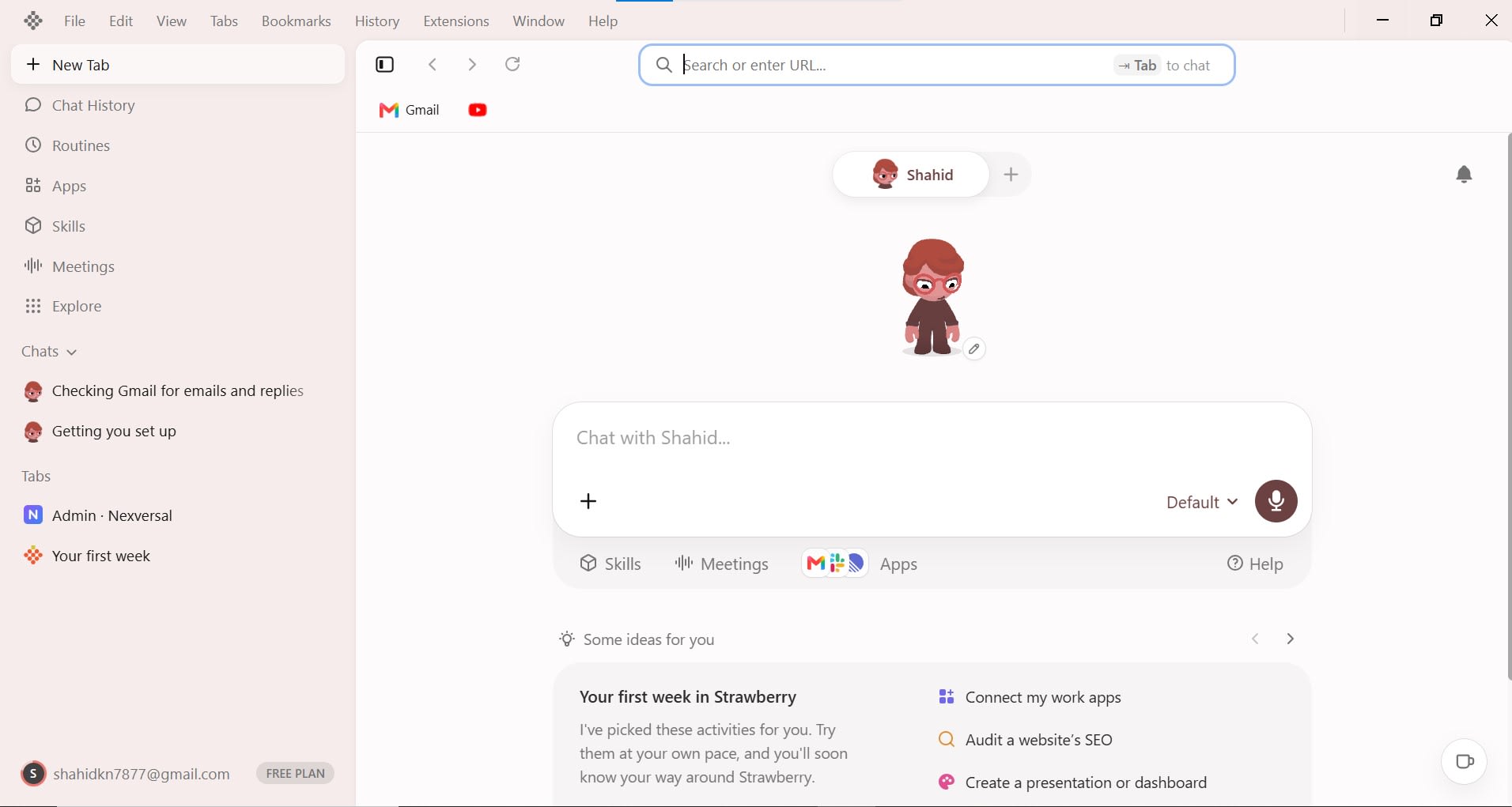
The Strawberry Browser is an AI
browser agent. It looks different from Google Chrome, but it works in a
similar way. You can open any website inside it and search just like you do in Chrome.
It runs on your PC and can control
your computer. It works online and on local files. It also saves your chat
history, passwords, and extensions. You can see your remaining credits
at any time.
•
Extensions: You can open the Chrome Web Store
inside it and add extensions.
•
Profile: You can customize your profile.
•
Memory: It keeps your chats and the work you
do in it.
How I Tested the Strawberry Browser
I gave Strawberry Browser AI Agent is a real job on my own
website. I asked it to edit an old article and then publish it. My first
testing session lasted about two to two and a half hours.
That first session used about 400 to
450 credits. After that, I ran two separate article edits. Here
are the numbers from all three tests.
|
Test |
What I asked |
Time taken |
Credits used |
|
First testing
session |
General testing
of the tool |
2 to 2.5 hours |
About 400 to
450 |
|
First article
edit |
"Edit my
article" with no full prompt |
40 minutes to
1.5 hours |
About 700 |
|
Second article
edit |
A clear list of
fixes |
About 30
minutes |
About 200 |
What Worked Well
Strawberry did the main job. It
updated my existing article and it worked. It also drafts locally when
you give it a command. When I allowed it, it published the article too.
It can add internal links and external
links. It can also write a new post. I connected four to five Google
apps, like Gmail and Docs, through the browser. All of them connected without
any problem.
•
Article
update: It edited my old
article correctly.
•
Local
draft: It saved a draft
on my computer when I asked.
•
Publishing: It published only after I gave
permission.
•
Linking: It added internal and external links.
•
New
posts: It can write a
fresh post.
What Went Wrong in My Article Edits
My first prompt was short. I only
said, "Edit my article." The agent changed the article, but it also
hurt my SEO. It removed some internal links. It also lowered my keyword
density and made the text harder to read.
I then sent a second prompt with exact
fixes. This time it worked better, but not perfectly. It added only four internal
links. It also left some long sentences untouched. In the end, I had
to make six fixes myself.
|
SEO check |
Before the
edit |
After the
first edit |
|
Keyword density |
About 1.5% |
0.18% |
|
Reading ease |
60% to 70% |
35% to 37% |
|
Sentence length |
Short sentences |
Many sentences
over 30 words |
|
Internal links |
Present |
Some removed |
• First
try: It lowered
keyword density, removed links, and made sentences long.
• Second
try: It fixed reading
ease, but it missed some long sentences.
• My
lesson: A short prompt
gives weak results. Always write a full, clear prompt.
One more thing happened during testing. My internet stopped working, so the test stopped in the middle. I then published the article myself.
Can Strawberry AI Test a Website and Find Its Problems?
Yes, and this was my most surprising test in this Strawberry AI review. I am building an audio and video downloader website. When I finished it, I gave the website to Strawberry AI on my own computer (localhost) and asked it to test the site before I used it myself.
Strawberry tested the whole website on its own. It did not wait for me to give it a test case. It picked a video URL from TikTok by itself and ran that video through my downloader to check if the tool worked.
After the test, it gave me the problems one by one. The clearest problem it found was in my transcribe feature. That feature turns a video or audio file into text. Strawberry found that it did not transcribe the full video. The transcription stopped in the middle.
It also gave me prompts to fix the problems it found. So I did not only get a list of errors. I also got a starting point to repair each one.
This test changed how I see the tool. My earlier tests in this Strawberry AI review were about editing old articles. This one showed that Strawberry can also check a new website like a tester, try a real task on it, and report what is broken.
How It Works Safely
Strawberry does not act on its own. It
asks for your permission first. It starts working only after you
approve. This also applies to publishing. It will not publish unless you
allow it.
You do not need to share your password
or email. First, log in to your admin panel yourself. Then paste the
admin URL into the chat. Sharing a password is not safe, so I do not recommend
it.
• Draft
first: It cannot draft
a published article by itself. You must draft it first and share the draft
link.
•
Login
first: You must already
be logged in to your website.
• Your
approval: It waits for you
before it starts and before it publishes.
Features I Checked
Strawberry lets you connect apps
like WhatsApp, GitHub, Google, and Microsoft. You can also connect search
engines, like Google and Bing. I connected Google myself. You can change
the language in the settings.
It also supports a custom MCP
server. You only need to add a name and a link. Another feature is routines.
You can give it a schedule, like 9 AM do this and 10 AM do that.
•
Apps: WhatsApp, GitHub, Google, Microsoft,
and more.
•
Search
engines: Google, Bing,
and others.
•
Custom
MCP: Add your own
server with a name and link.
•
Routines: Give it a full roadmap for the day.
•
First-week
tasks: After sign-up,
it gives you tasks based on your niche.
Problems I Faced
I faced one clear problem. When I
tried to connect some apps inside Strawberry, such as Slack, I only saw a blank
page. Nothing loaded. When I used the Connect via browser option, it
worked fine.
I am not sure about the cause. It may
be my internet, or it may be the app. Also, the speed is okay but not
very fast. One article task took me up to 40 minutes.
Strawberry Browser Pricing
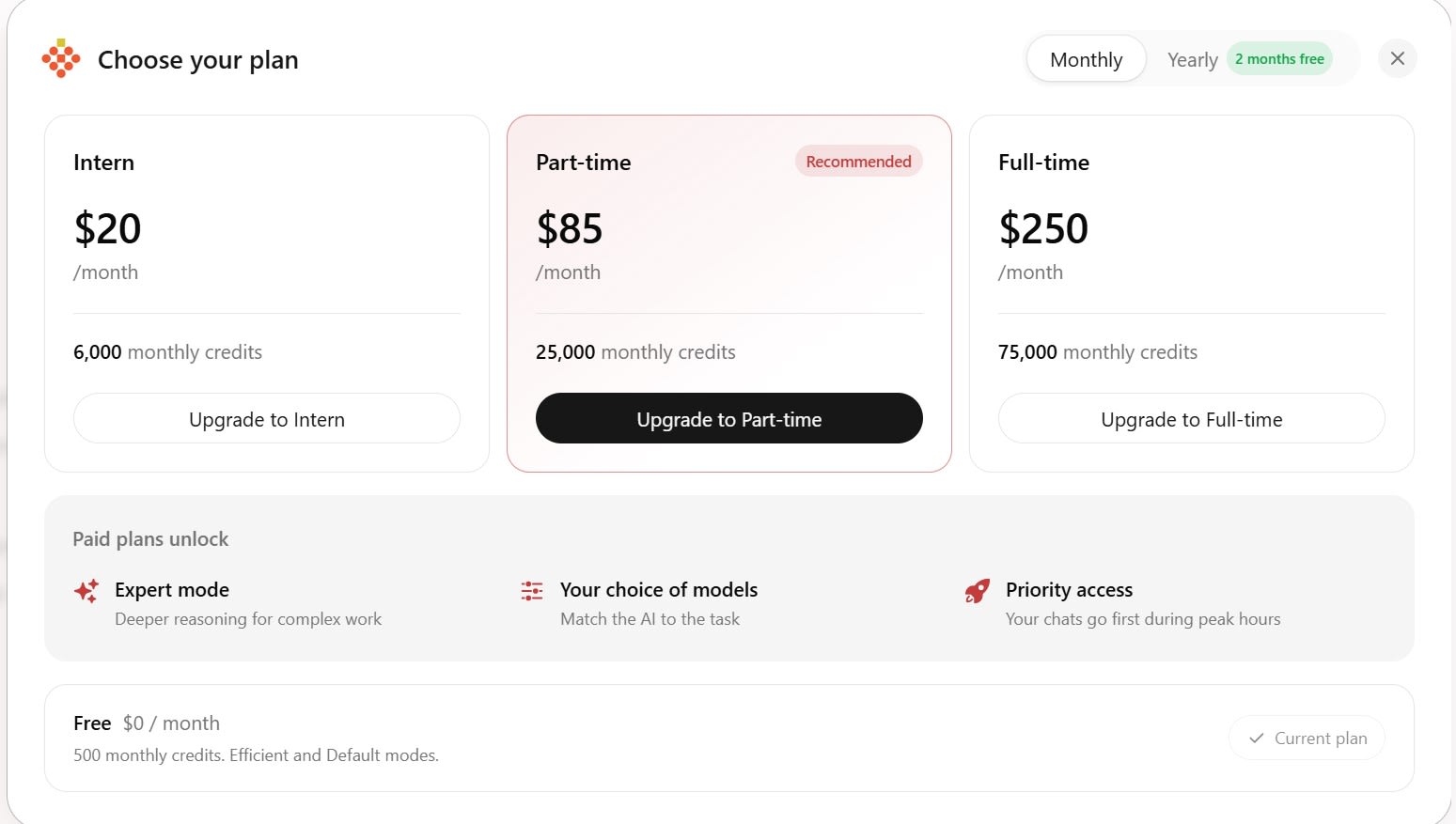
Strawberry has a free plan and three
paid plans. The free plan gives 500 credits each month. Paid plans give
more monthly credits and unlock extra features. The yearly option gives two
months free.
|
Plan |
Monthly price |
Monthly credits |
|
Free |
$0 |
500 |
|
Intern |
$20 |
6,000 |
|
Part-time |
$85 |
25,000 |
|
Full-time |
$250 |
75,000 |
On the yearly plan, the cost works out
to about $17, $71, and $208 per month. Paid plans unlock Expert mode,
your choice of models, and priority access. The free plan has
only Efficient and Default modes.
What I Have Not Tested Yet
I did not test everything. Some parts
are still open, and I want to be honest about them. I will update this review
when I test them.
•
A
full, detailed prompt for article editing
•
Rank
Math score after an edit
•
Cover
image, category, slug, and meta description
•
Routines
and the meeting feature
•
A
custom MCP server
•
Other
search engines, like Bing
•
Expert
mode and different models
•
Credits
needed for one full new article
•
Batch
work on many articles
•
Use
on a phone
Who Should Use It?
Strawberry suits bloggers and website
owners who want help with editing. It is useful if you can write clear
prompts. It also helps if you plan to check the work after each edit.
It is not for people who want fully
hands-off publishing. My tests show it can miss details. You still need to
check links, keyword density, and reading ease.
Pros and Cons
Here is a quick look at the good and
bad sides. Everything below comes from my own tests.
Pros
•
Edits
articles: It updated my
old article correctly.
• Asks
first: It waits for
your permission before it works or publishes.
•
No
password needed: You
log in yourself and share only the admin URL.
• Local
drafts: It saves a draft
on your computer when you ask.
•
Links: It can add internal and external
links.
•
New
posts: It can write a
fresh post.
• Many
apps: Google apps
connected easily. You can also connect WhatsApp, GitHub, and Microsoft.
•
Extra
tools: It supports a
custom MCP server and routines.
•
Free
plan: You get 500
credits to try it.
• Cheaper
with a clear prompt: My
second edit used about 200 credits.
Cons
• Weak
with short prompts: My
first edit removed internal links and cut keyword density from 1.5% to 0.18%.
• Hard
to read: Reading ease
fell from 60% to 70% down to 35% to 37%.
• Missed
details: It left some
long sentences and added only four internal links.
• Extra
work for me: I had to make
six fixes myself.
• Not
very fast: One article task
took up to 40 minutes.
• Credits
add up: My first edit
used about 700 credits.
• Draft
first: It cannot draft
a published article by itself.
• Slack
problem: The Connect
button showed a blank page.
• Paid
features: Expert mode and
model choice need a paid plan.
Frequently asked questions
Is the Strawberry Browser free?+
Yes, it has a free plan. It gives you 500 credits each month. It includes only Efficient and Default modes.
Can Strawberry publish articles?+
Yes, it can. It publishes only after you give permission. It does not publish on its own.
Is it safe for my website login?+
You do not need to share your password. Log in to your admin panel yourself. Then give it the admin URL.
How many credits does an article edit use?+
In my tests, one edit used about 700 credits. Another edit used about 200 credits. It depends on your prompt.
What is the Strawberry Browser?+
The Strawberry Browser is an AI browser agent. It looks different from Chrome, but it works in a similar way. It can edit articles, draft posts, and connect with many apps.
Is the Strawberry Browser safe?+
In my tests, it did not act without my permission. You do not need to share your password. Log in to your admin panel yourself and give it only the admin URL.
How much does the Strawberry Browser cost?+
It has a free plan with 500 credits. Paid plans cost $20, $85, and $250 per month. They give 6,000, 25,000, and 75,000 credits.
Is the Strawberry Browser free?+
Yes, it has a free plan. You get 500 credits each month and two modes, Efficient and Default. Expert mode and model choice need a paid plan.
Related articles
 AI Chatbots & Assistants
10 Best ChatGPT Alternatives in 2026 (Free & Paid)
Looking for the best ChatGPT alternatives in 2026? Compare Claude 3.5 Sonnet, Google Gemini, Perplexity, and DeepSeek for coding, writing, and live research.
 AI Chatbots & Assistants
Dante AI Review 2026: I Tested This AI Chatbot Platform
I tested Dante AI on the Pro plan. This Dante AI Review covers chatbot setup, lead capture, voice calls, model credits, pricing, and the limits I found.
 AI Chatbots & Assistants
Gemini Notebook Review 2026: Features, Pricing & Limits
Google Notebook review 2026: features, Google AI plan prices, notebook and source limits, privacy, and the real limits of this AI research assistant.
New AI tool reviews, in your inbox.
Get new reviews and comparisons in your inbox. No spam, unsubscribe anytime.
Comments (0)
Be the first to comment.