Best AI Tools For Text-to-Video Generators in 2026: Compared Tools
AI Text-to-Video Generators compared: 10 top tools, real pricing, and honest reviews for 2026. Find your perfect fit — see the full guide now.
The best AI tools for text-to-video generators are changing how quickly you can turn simple ideas into engaging videos. But which tools actually deliver quality results, and how do they work? This guide shows how AI text-to-video generators transform written prompts into videos using artificial intelligence, realistic visuals, motion, and sometimes AI voice generation. We cover the best tools, key features, pricing, strengths, and limitations, so you can pick the right generator for social content, marketing videos, tutorials, or cinematic clips.
Best AI Tools For Text-to-Video Generators: What You Need to Know?
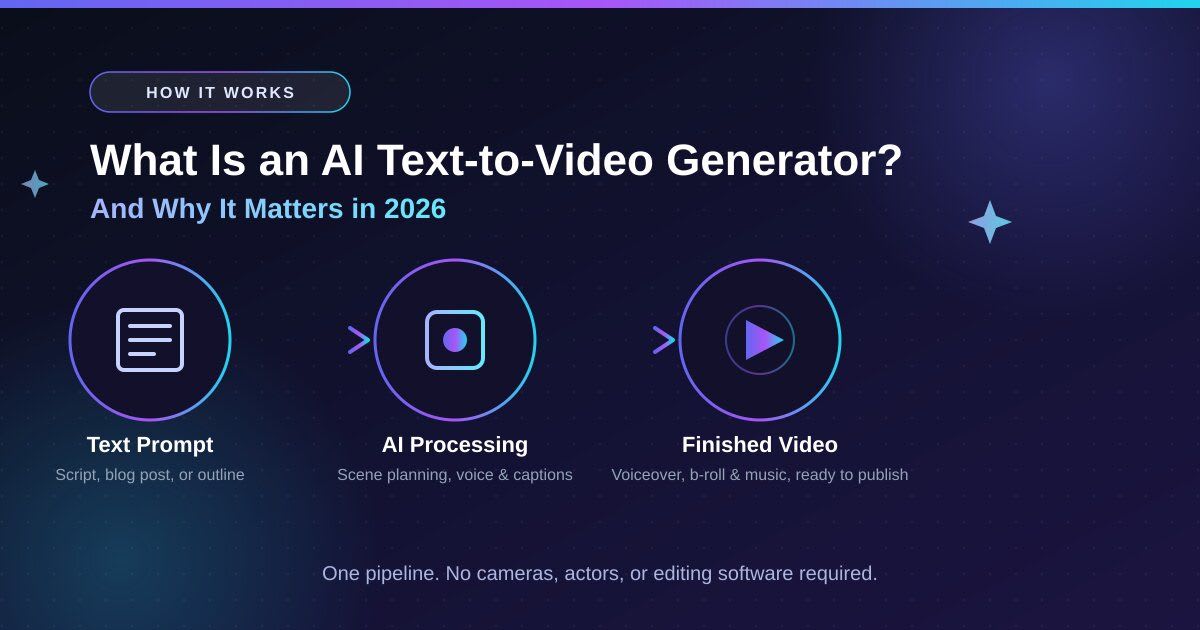
When comparing the Best AI Tools For Text-to-Video Generators, it helps to understand how these platforms turn written ideas into complete video projects.
An AI text-to-video generator converts written input, a prompt, script, blog post, or outline, into a fully assembled video with voiceover, captions, b-roll, and music. It removes the need for cameras, actors, and editing software. Content teams face more channels, less time, and tighter budgets, so this technology has become the practical way to scale output without growing headcount.
Most modern tools use diffusion-based or transformer-based video models. The pipeline runs in stages:
- Your text input triggers AI scene planning.
- The model assembles visuals through automatic scene assembly.
- It aligns a TTS voice selection to the timeline.
- It generates auto subtitles in one pass.
Multimodal models like Google Veo 3.1 go further, adding native audio generation so sound effects, ambient noise, and dialogue emerge directly from the prompt with no post-production step.
Kling 3.0 generates videos up to five minutes long at native 4K resolution and 60fps, with multi-shot directing across six camera cuts and independent tracking of up to three people. Veo 3.1's native audio eliminates a post-production step that used to add 30–50% to production costs. These are no longer demos; they're real production tools.
Quick Answer: An AI text-to-video generator converts written prompts or scripts into fully assembled videos with voiceover, captions, b-roll, and music. In 2026, tools like VideoGen, Runway Gen-4, and Synthesia lead the category, combining high automation with pro-level editorial control.
Why Use AI Text-to-Video Tools in 2026?
The Best AI Tools For Text-to-Video Generators can simplify production by combining scripting, visuals, voiceovers, captions, and editing in one workflow.
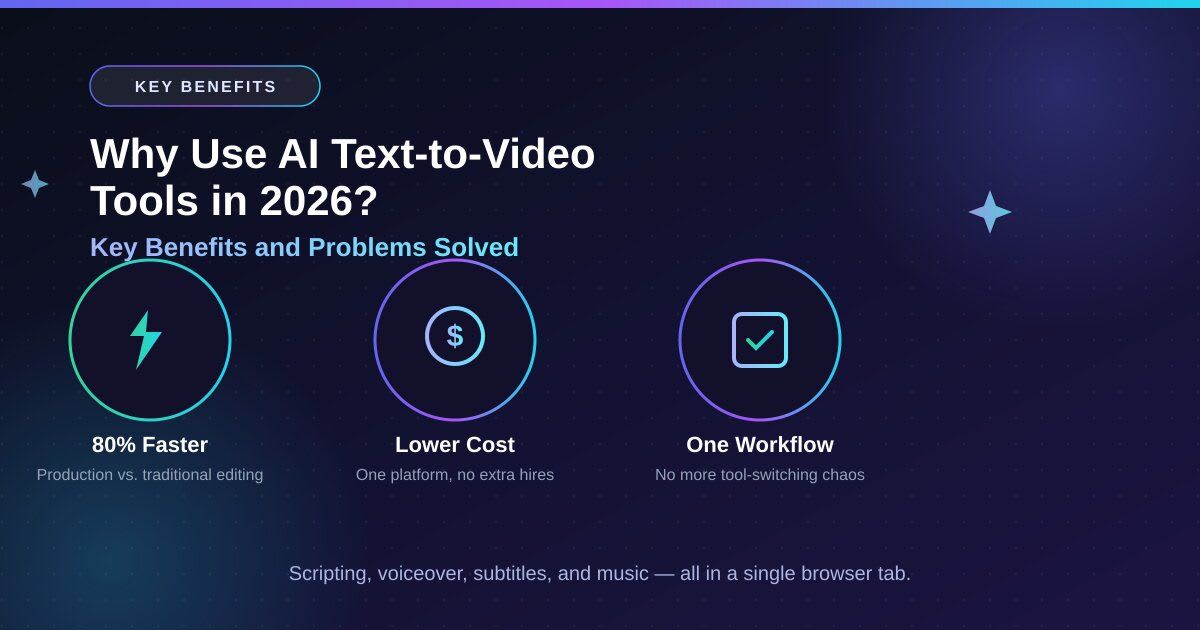
The old video production stack was slow: write the script, hire a voiceover artist, hunt for b-roll across stock sites, edit in Premiere, then export captions separately. That process eats four to eight hours per finished video. An AI text-to-video generator collapses this into one browser tab. Teams report up to 80% faster production, letting a team that once shipped two videos weekly ship ten without adding an editor.
Common problems these tools solve for teams:
- Multi-tool workflow fragmentation, the most common complaint from content teams.
- Stock footage copyright risk from unverified sources.
- Inconsistent voiceover quality across long series.
- A slow video localization bottleneck when adapting content for global markets.
AI video tools bundle licensed music, royalty-free footage, multilingual voiceover, and closed captions into one timeline, removing compliance headaches and tool-switching overhead.
Quick Answer: AI text-to-video tools combine scripting, voiceover, subtitles, b-roll, and music in one platform. Teams report up to 80% faster production with measurable cost reductions per finished video.
What to Look for in a Text-to-Video Generator
Before choosing among the Best AI Tools For Text-to-Video Generators, compare output quality, automation, editing control, pricing, and export options.
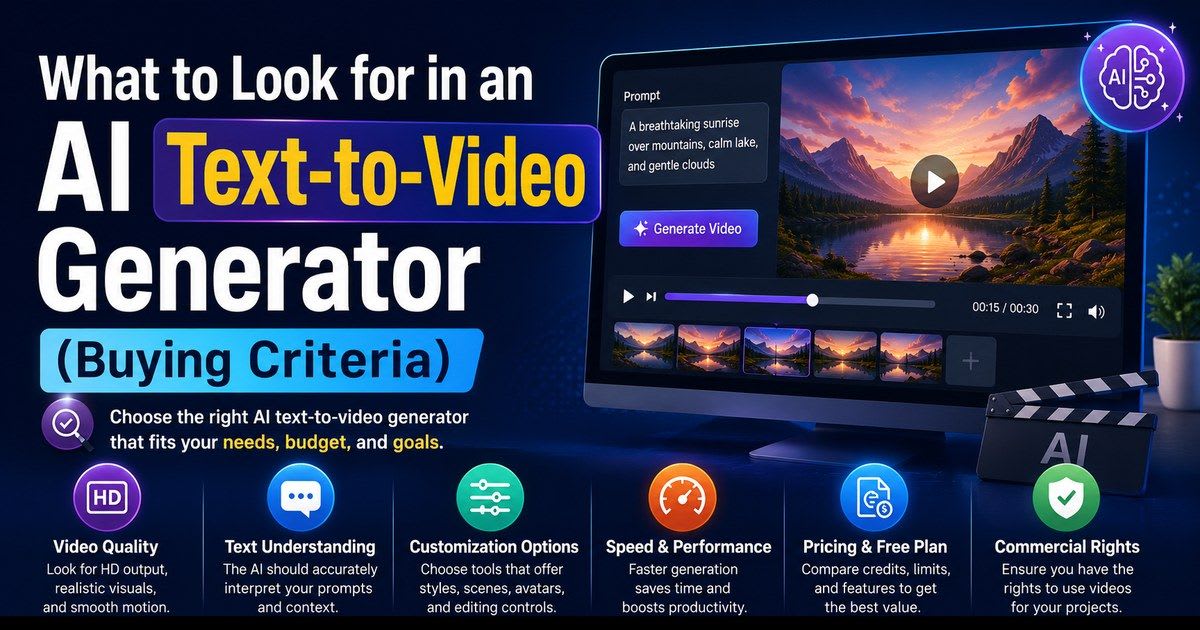
Not all generative AI video tools are equal. The best platforms automate assembly while keeping editors in control of scenes, pacing, and branding. Evaluate tools on output quality, script-to-publish speed, subtitle accuracy, stock licensing terms, and platform scalability. Pricing transparency matters too, since credit-based rendering can hide the real cost.
| Capability | Details |
|---|---|
| AI Script Writer | Outline-to-video pipeline with scene planning built in. |
| Voiceover Controls | Style controls, speed control, and multiple voice personas. |
| Voice Timing Alignment | Keeps voiceover synced so it never runs ahead of visuals. |
| Caption Automation | Timing automation with speaker detection and styling options. |
| Smart B‑roll Matching | Pulls visuals from script context, not just keywords. |
| Licensed Media | Background music and stock footage with clear commercial rights. |
| Translation & Localization | Multilingual production support with localized caption styles. |
| Brand Kits | Logo placement, font locking, and color palette controls. |
| Collaboration & Review | Draft approval workflow, commenting, and version history. |
Watch for opaque credit-based rendering systems, since the math between credits and finished video minutes can be confusing. Check whether watermark removal needs a paid upgrade, whether the tool offers role-based access for team governance, and how active the product roadmap is. This space moves fast, and a stagnant tool becomes a liability within six months.
Quick Answer: Prioritize automation quality, subtitle accuracy, brand kit support, and pricing transparency. Teams scaling production also need collaboration tools, translation features, and flexible export resolution.
Quick Comparison Table — Top Tools (2026)
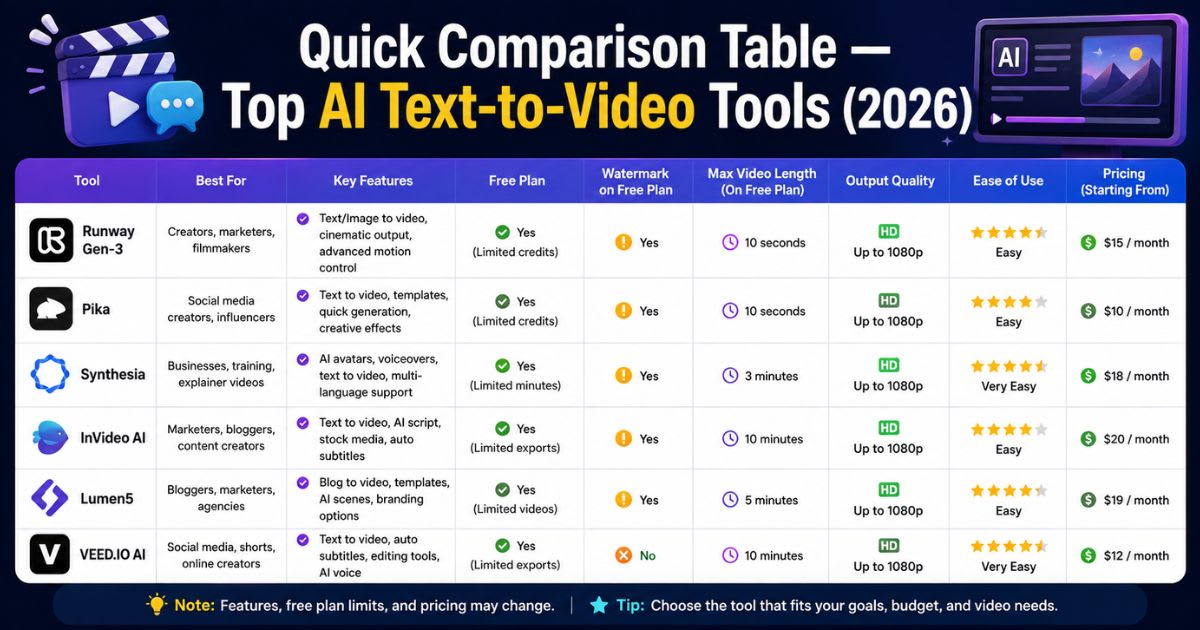
Here's a quick comparison built from our research across all ten tools:
| Tool | Best For | Free Plan | Starting Price | Automation |
|---|---|---|---|---|
| VideoGen | End-to-end team production | Yes | $16.50/mo | High |
| Runway Gen-4 | Cinematic creative control | Yes | $12/mo | High |
| Synthesia | AI avatar corporate training | 3/mo | $18–$29/mo | Medium |
| InVideo AI | Social media quick content | Yes | $17/mo | Medium |
| Fliki | Voice-led narration videos | Yes | $8/mo | Medium |
| Pictory | Blog-to-video repurposing | Yes | $25/mo | Medium |
| Colossyan | L&D and internal comms | No | $27/mo | Medium |
| Kling AI 3.0 | Long-form realistic motion | Yes | ~$10/mo | High |
| Pika | Creative social shorts | Yes | ~$10/mo | Medium |
| Google Veo 3.1 | Cinematic generative clips | No | Limited access | High |
Always verify live AI tool pricing on each tool's official website, since it changes frequently.
Top 10 Best AI Text-to-Video Generators (In-Depth Reviews)
Choosing the right generator comes down to matching its strengths to your workflow. Here is the honest breakdown from real production testing, not just a spec-sheet comparison.
VideoGen — Best for End-to-End Team Production
VideoGen is the strongest choice for a true script-to-publish workflow, taking a raw prompt or blog post to a polished video with translation, subtitles, and branding, all without leaving the platform. Its draft approval workflow and version history suit recurring content series where consistency matters.
- Features: AI script writer, voice timing alignment, smart b-roll matching, translation, brand kit.
- Pros: True end-to-end workflow; strong brand governance and collaboration.
- Cons: Brief onboarding needed; not built for pure cinematic clips.
- Best for: Marketing teams, content agencies, multilingual content production.
Runway Gen-4 — Best for Cinematic Creative Control
Runway treats generation as one step inside a real editing workflow. Gen-4.5 keeps characters and sets consistent across shots, and the motion brush pushes movement exactly where you want it. The Standard plan costs $12/month billed annually, with 625 monthly credits and no watermark.
- Features: Camera movement control, shot memory AI, dynamic transitions, 4K export.
- Pros: Best-in-class camera automation; strong editing tools.
- Cons: Clips top out around 5–10 seconds; no built-in subtitles or brand kit.
- Best for: Ad agencies, filmmakers, promotional video creation.
Synthesia — Best for AI Avatar Corporate Videos
Synthesia creates professional, presenter-led videos without cameras or actors. The free plan costs $0, Starter runs $18–$29/month, and Creator costs $64–$89/month. Support for 140+ languages makes it a go-to for global L&D teams.
- Features: AI avatar video, SCORM export, lip-sync accuracy, LMS integration.
- Pros: Best avatar realism; unmatched language support.
- Cons: Custom avatars cost $1,000/year each; enterprise pricing turns opaque.
- Best for: HR teams, L&D managers, employee onboarding video.
InVideo AI — Best for Quick Social Content
InVideo AI turns a prompt into a script, searches its libraries for matching content, then assembles the video with voiceover, text overlays, music, and transitions added automatically. Pricing ranges from $0 to $120/month.
- Features: Automatic scene assembly, short-form templates, vertical auto-crop, AI stock search.
- Pros: Access to 6,000+ templates and 3M+ media assets; fast onboarding.
- Cons: Lighter brand consistency than VideoGen; credit system can get opaque.
- Best for: Social media managers, small businesses, faceless channels.
Fliki — Best for Voice-Led Narration
Fliki's text-to-speech engine leads the pack for narration work, with a deep TTS voice library and fine-grained style controls. It also works well as a podcast-to-video converter: paste a transcript, pick a voice, and it assembles the visuals.
- Features: Deep TTS voice selection, voice timing alignment, storyboard auto-generation.
- Pros: Strongest voice library depth; very easy onboarding.
- Cons: Limited scene-level editing; not built for team collaboration.
- Best for: Educators, podcasters, tutorial video generation.
Pictory — Best for Blog-to-Video Repurposing
Pictory offers the fastest path from a published article to a shareable clip. Drop in a URL, and it auto-chapters the content, pairs stock visuals to key points, and generates captions automatically.
- Features: Video from URL, auto-generated chapters, closed caption generation.
- Pros: Fastest content repurposing workflow; strong auto-chaptering accuracy.
- Cons: Limited collaboration tools; lighter timeline controls than VideoGen.
- Best for: Content marketers, SEO teams, bloggers.
Colossyan — Best for L&D and Internal Comms
Colossyan's AI avatar system is purpose-built for organizations needing presenter-led training content at scale. Pricing runs $27/month per seat with LMS integration and SCORM export standard, often at a lower total cost than Synthesia for training-specific needs.
- Features: AI avatar video, 80+ languages, SCORM export, LMS integration.
- Pros: Lower cost than Synthesia for training; built-in LMS compliance.
- Cons: Narrow use case; not ideal for social or cinematic work.
- Best for: L&D managers, compliance teams, corporate training.
Kling AI 3.0 — Best for Realistic Long-Form Motion
Kling's motion physics engine stands apart for realism. Version 3.0 can generate videos up to five minutes long, a duration neither Veo nor Runway can match. At $0.07 per second, it runs about 65% cheaper than Sora and roughly 44% cheaper than Runway.
- Features: 5-minute video synthesis, 4K export at 60fps, multi-subject tracking.
- Pros: Longest single-pass generation; most cost-effective cinematic option.
- Cons: Less editorial depth than VideoGen; no built-in subtitles or brand kit.
- Best for: Creative directors, e-commerce product video, real estate video.
Pika — Best for Creative Social Experiments
Pika thrives in the creative short-form space, where speed beats polish. It's community-driven, with new effects dropping regularly, making it a playground for indie creators testing new formats fast for Reels, TikTok, and news recap clips.
- Features: Prompt-to-video, short-form templates, vertical auto-crop.
- Pros: Fast and fun to use; keeps content feeling fresh.
- Cons: Minimal enterprise controls; limited multilingual support.
- Best for: Indie creators, social teams, creative experimentation.
Google Veo 3.1 — Best for Cinematic Generative Quality
Veo represents the current ceiling of raw visual fidelity and was the first major AI video generator with synchronized audio. Since Veo 1 launched in May 2024, the family has evolved fast, with 3.1 delivering native 4K video at 60fps and built-in synchronized audio. Access remains limited, and every output carries mandatory SynthID watermarking.
- Features: Native audio generation, 4K export, ambient sound and dialogue generation.
- Pros: Best raw cinematic output; eliminates the post-production audio step.
- Cons: Access is limited; mandatory watermarking; no team workflow features.
- Best for: R&D teams, high-budget ad concepting.
Quick Answer: VideoGen leads for team production, Runway Gen-4 for cinematic control, Synthesia for avatars, Kling AI 3.0 for long-form motion, and Google Veo 3.1 for generative realism. Each serves a different use case and budget.
AI Text-to-Video Tools by Use Case
The Best AI Tools For Text-to-Video Generators are not identical, so your use case should guide the final choice.
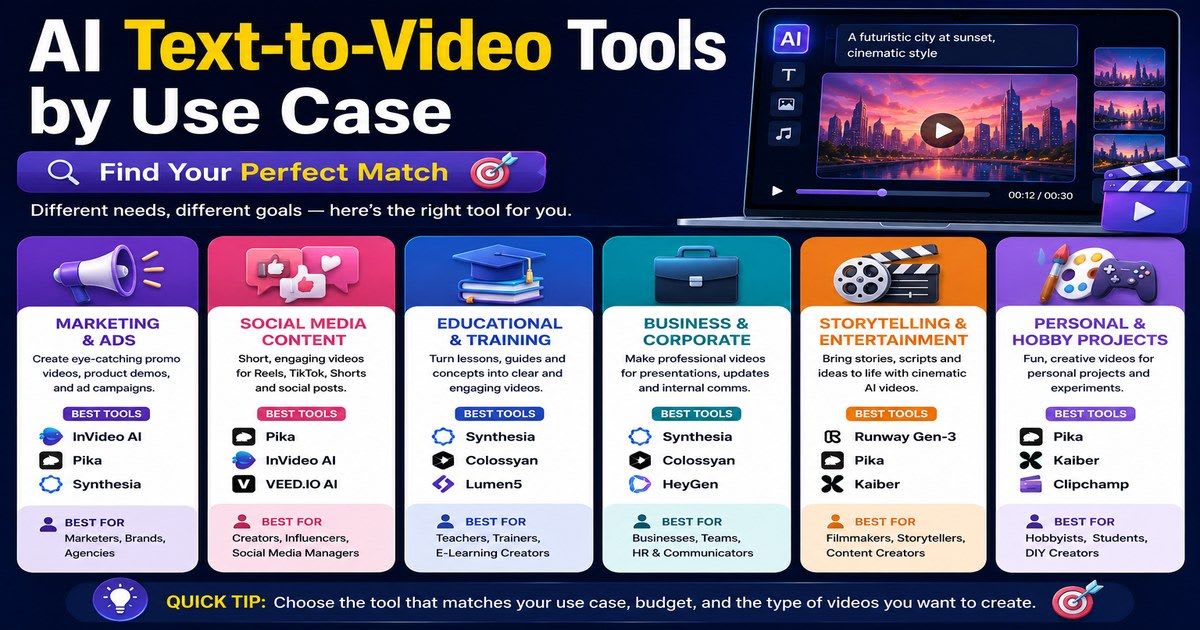
The biggest mistake buyers make is choosing a tool based on hype instead of fit. A generative video tool with jaw-dropping cinematic clips can still be useless if you actually need SCORM export for your LMS. Use the cheat sheet below to match production needs to the tools built for those jobs.
- YouTube automation / faceless channels: VideoGen (runner-up: InVideo AI)
- Employee onboarding / corporate training: Synthesia (runner-up: Colossyan)
- Blog to video / content repurposing: Pictory (runner-up: VideoGen)
- Instagram Reels / social ads: InVideo AI (runner-up: Pika)
- Multilingual content / global teams: VideoGen (runner-up: Colossyan)
- Cinematic output / film & ad production: Runway Gen-4 (runner-up: Kling AI 3.0)
- Podcast to video / narration content: Fliki (runner-up: VideoGen)
- E-commerce product video: Kling AI 3.0 (runner-up: InVideo AI)
- Educational video / how-to content: Fliki (runner-up: Synthesia)
- Generative video R&D: Google Veo 3.1 (runner-up: Runway Gen-4)
- Video testimonial automation: HeyGen AI avatar (runner-up: Synthesia)
- Real estate video / property tours: Kling AI 3.0 (runner-up: Runway Gen-4)
- News recap / quick social updates: InVideo AI (runner-up: Pika)
Team size also shapes the choice. Solo creators should prioritize generous free plans and simple export, with InVideo AI, Fliki, and Pika fitting well. Small teams of 2–10 need commenting and brand consistency, where VideoGen and Colossyan shine. Enterprise governance, multi-brand management, and API access matter most at 10+ seats, a level only VideoGen and Synthesia fully deliver.
Quick Answer: Choose your tool by use case first. VideoGen suits team production, Synthesia suits avatar training, Pictory suits blog repurposing, and Runway suits cinematic work. Team size and output volume should guide the final decision.
Pricing Compared — Which Tool Gives Best Value?
When evaluating the Best AI Tools For Text-to-Video Generators, compare the real cost of producing finished videos rather than relying only on advertised monthly prices.
Pricing across this category is genuinely confusing, often by design. Some platforms advertise a low monthly rate but lock core features behind credit-based rendering that runs out fast. Others bundle everything but charge enterprise rates for basic team features. The only fair comparison method calculates cost per video at your actual output volume, since a cheap tool needing two hours of manual cleanup isn't actually cheap.
- Tiered subscription (VideoGen, InVideo, Fliki, Pictory): Fixed monthly fee with feature tiers, predictable for consistent output.
- Seat-based (Synthesia, Colossyan): Per-user fee that scales with team size, good for defined enterprise seat counts.
- Credit-based (Runway, Pika, Kling AI): Pay per generation, flexible but unpredictable at high volume.
- Usage-based hybrid (VideoGen): Tiered seats plus optional render credits, the most transparent baseline-plus-burst model.
Watch for hidden costs: custom avatars can run $1,000/avatar annually, minute overages often cost $2–$5 each, and extra seats usually need full paid subscriptions.
| Tool | Free Plan | Watermark | Export | Limit |
|---|---|---|---|---|
| VideoGen | Yes | Yes | 1080p | Limited renders |
| InVideo AI | Yes | Yes | 1080p | 10 min/week |
| Fliki | Yes | Yes | 720p | Limited minutes |
| Pika | Yes | No | 1080p | Monthly credits |
| Runway | Yes | No | 720p | 625 credits/mo |
| Synthesia | Yes | Yes | 1080p | 3 videos/mo |
| Kling AI | Yes | No | 1080p | Limited credits |
| Colossyan | No | — | — | No free tier |
Free tiers work well for testing and small projects. The moment you need consistent branding, watermark-free export, or multi-user workflows, a paid plan becomes necessary. Never build a production pipeline on a free tier alone.
Quick Answer: Pricing ranges from free tiers to seat-based enterprise plans. InVideo AI, Fliki, and Pika lead on free access, while Synthesia and Colossyan lead on enterprise seats. Tiered subscriptions with optional render credits, like VideoGen's, offer the most transparent pricing for scaling teams.
How to Create a Video from Text Using AI
Using a good AI text-to-video generator, the prompt-to-finished-video process takes under 30 minutes. Most tutorials skip the setup decisions that determine whether your draft needs 10 minutes of cleanup or two hours. Get the setup right, and automation does the heavy lifting.
- Choose your input: a freeform prompt, full script, blog post URL, or structured outline. Structured inputs give better scene planning than vague prompts.
- Select your tool based on the use case table above, not on whichever looks flashiest.
- Configure settings: voice persona, aspect ratio, language, and style preset. Use 16:9 for YouTube and 9:16 for Reels.
- Review your AI draft: check voice timing against visual cuts, and scan subtitles for accuracy on proper nouns (expect roughly a 5% error rate).
- Apply your brand kit: lock logo placement, fonts, and color palette, the step that separates professional output from generic AI content.
- Export and publish: use 1080p for most social platforms and 4K for commercial work, then save the configuration as a reusable template for recurring series.
Quick Answer: Choose your input first (prompt, script, or blog post), configure voice and style settings, review the auto-assembled draft, apply brand elements, then export. The process takes under 30 minutes with tools like VideoGen or InVideo AI.
How to Choose the Right Tool for Your Needs
Choosing from the Best AI Tools For Text-to-Video Generators becomes easier when you match each platform to your content goals, production volume, and budget.
The biggest mistake isn't choosing a bad tool, it's choosing a good tool for the wrong job. A cinematic model won't solve a training problem it was never built for. Optimize for the lowest cost per video at your actual monthly volume, not the cheapest sticker price: a $50 platform delivering publish-ready output in 30 minutes often beats a $12 platform needing two hours of cleanup.
Three Questions to Ask Before You Start a Free Trial
| If you need... | Choose... |
|---|---|
| Full team pipeline + brand governance | VideoGen |
| Cinematic quality for film/ad work | Runway Gen-4 |
| Avatar-based corporate training | Synthesia |
| Quick social content with templates | InVideo AI |
| Simple voice-led narration | Fliki |
| Blog and article repurposing | Pictory |
| Long-form realistic motion clips | Kling AI 3.0 |
| Creative short-form experiments | Pika |
Also weigh your team size and collaboration needs. Solo creators can rely on any free tier, teams of three or more need commenting, version history, and role-based access, and enterprise teams additionally need SSO and API automation. On volume, fewer than four videos monthly suits a free or entry-level plan, while 10–30 videos monthly calls for batch production support and transparent render-minute pricing.
Red Flags to Avoid
- A platform that can't clearly explain cost per finished video, the top churn driver in this category.
- No preview sharing before export, which usually forces stakeholders to download and email files.
- Unverified translation quality, since localized output varies wildly between tools claiming broad language support.
- No major product update in six months, a sign the platform is falling behind.
Quick Answer: Choose an AI text-to-video tool by matching your use case, team size, and output volume. VideoGen suits scaling teams, Runway suits creatives, and Synthesia suits L&D. Avoid tools with opaque credit pricing, no subtitle editing, or inactive product development.
Meta Description
Discover the 10 best AI text-to-video generators in 2026. Compare features, pricing, free plans, use cases, and the best tool for your needs.Frequently asked questions
What Is the Best Free AI Talking Video Generator?+
Synthesia is a strong free pick, offering three avatar videos a month at no cost. HeyGen also has a decent free tier for talking-head style videos.
Is There a Free AI Text-to-Video Generator for 1-Minute Videos?+
Yes. InVideo AI's free plan allows up to 10 minutes of AI generation weekly, easily covering a 1-minute AI text-to-video generator output, though usually with a watermark.
Is There an AI Text-to-Video Generator That's Free With No Restrictions?+
Not truly. Every AI text-to-video generator limits something on its free plan, whether that's length, credits, or resolution. InVideo AI and Fliki come closest to unrestricted use.
Is There an AI Text-to-Video Generator Without a Watermark?+
Yes, a few do. Runway, Pika, and Kling AI skip the watermark even on free plans, capping monthly credits instead. Most others add one until you upgrade.
What Is the Best AI Text-to-Video Generator?+
VideoGen leads as the best all-around AI text-to-video generator for 2026. Runway Gen-4 wins for cinematic quality, while Synthesia leads for avatar-based training.
Related articles
New AI tool reviews, in your inbox.
Get new reviews and comparisons in your inbox. No spam, unsubscribe anytime.
Comments (0)
Be the first to comment.