GitKraken Kepler: How to Use GitKraken Kepler for AI Coding in 2026
Master GitKraken Kepler in 2026. Run multi-agent AI coding across repositories with visual Git graphs and safe live diffs.
Introduction
Modern software engineering demands speed without
sacrificing architectural control across large codebases. GitKraken Kepler emerges as a
purpose-built Agentic Developer Environment designed to orchestrate autonomous AI coding agents across complex
projects. Unlike basic chat extensions that only assist with isolated snippets,
Kepler bridges the gap between machine intelligence and disciplined Git version control.
It links multiple foundation models directly to your
local repository, automating
file generation, testing suites, and branch management simultaneously. By
integrating visual diffs with seamless pull requests preparation, the platform boosts developer productivity and
eliminates context switching. Mastering this tool allows engineering teams to
ship high-quality features faster while retaining complete oversight.
What Is GitKraken Kepler and How Does It Redefine AI Development?
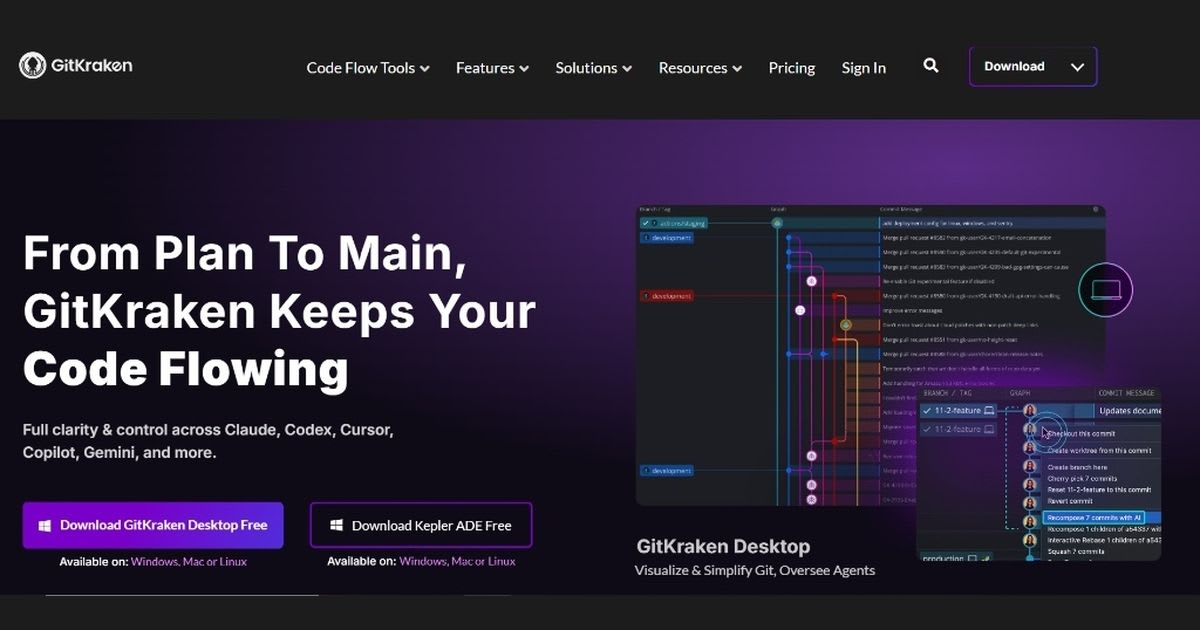
GitKraken Kepler is a modern Agentic Developer Environment. It helps you run
smart AI coding agents across large projects. Old tools make you paste
code into simple chat boxes. Kepler links smart models directly to your local
repository through visual repository management. It writes files,
runs tests, and creates branches for you. Engineers can design big systems
while agents do the daily typing. Teams use GitKraken Kepler to build
whole features in one place. It tracks every agent step inside your Git
version control and your commit history. The tool checks every code
change before it hits main branches. Developers see the whole plan with modern software
development tools and better developer productivity. This removes
guesswork and gives you full control over your code.
From Traditional
IDE Assistants to the Agentic Developer Environment (ADE)
Old
code tools only helped with one file inside a single integrated development
environment. An ADE coordinates autonomous AI-powered development
and AI-assisted coding across full systems. It uses deep repo context to
solve hard problems in modern development environments.
Core Architecture:
One Task, Every Repo, Every Agent Workflow
The
core engine gives clear jobs to smart reasoning models. It connects
microservices using shared Git remotes, structured Git repository
files, and fast agent-driven development. This clean software
development workflow keeps all your backend and frontend services in sync.
Why Developers in
2026 Need Cross-Repository Agent Autonomy
Modern
software does not live in one folder. Teams need solid cross-platform
development tools to update APIs and apps at once. Cross-repo agents remove
slow handoffs to raise team speed, code safety, and developer productivity.
Key Capabilities: Multi-Agent Orchestration & Workflow Modes
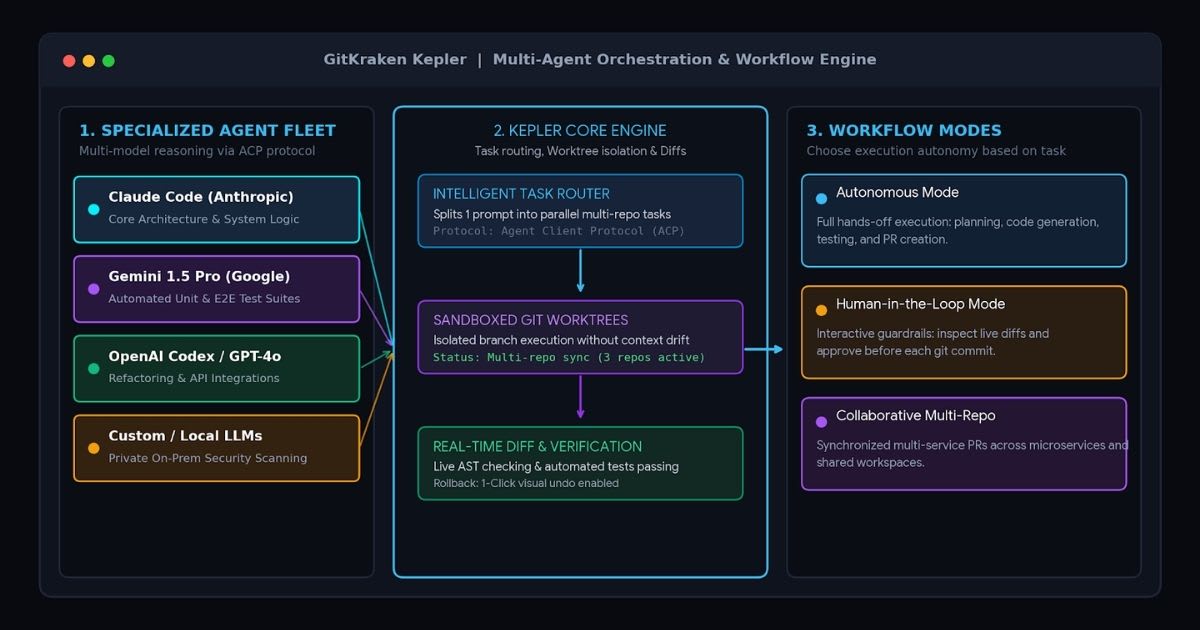
GitKraken Kepler runs top models like Claude Code, Codex, and Gemini
side by side. You can pick the best model for each job. One model writes core
logic while another writes tests. The app handles setup and worktree
detection automatically. This multi-agent setup gives each coding step the
right tool. Managing your work with GitKraken Kepler gives your team
total freedom. You can let agents work on their own or step in when needed. The
system uses the Agent Client Protocol to guide models during live AI
agent sessions. This keeps your daily developer workflow smooth and
improves your overall developer experience.
Choosing Your
Agent: Claude, OpenAI, and Specialized LLMs
Pick
models like Copilot, Augment, or OpenCode based on your
task. Picking the right model boosts speed, improves coding agent
integration, and cuts token costs during long AI-assisted coding
sessions.
Three Ways to
Start a Task in Kepler for Fast Execution
You
can start tasks with plain English prompts, bug tickets, or a simple terminal
workflow. Each method opens a safe workspace with terminal-based coding
agents. This matches how you already like to work in your software
development workflow.
Automated
Pipeline: Taking Complex Features from Idea to Merged PR
The
system takes written plans, writes code, tests features, and builds pull
requests. It finishes pull request preparation with zero manual
work. Developers can review final code instead of writing basic glue during Git
productivity sprints.
High-Level Workspace Control: "See the Whole Board" Across
Repositories
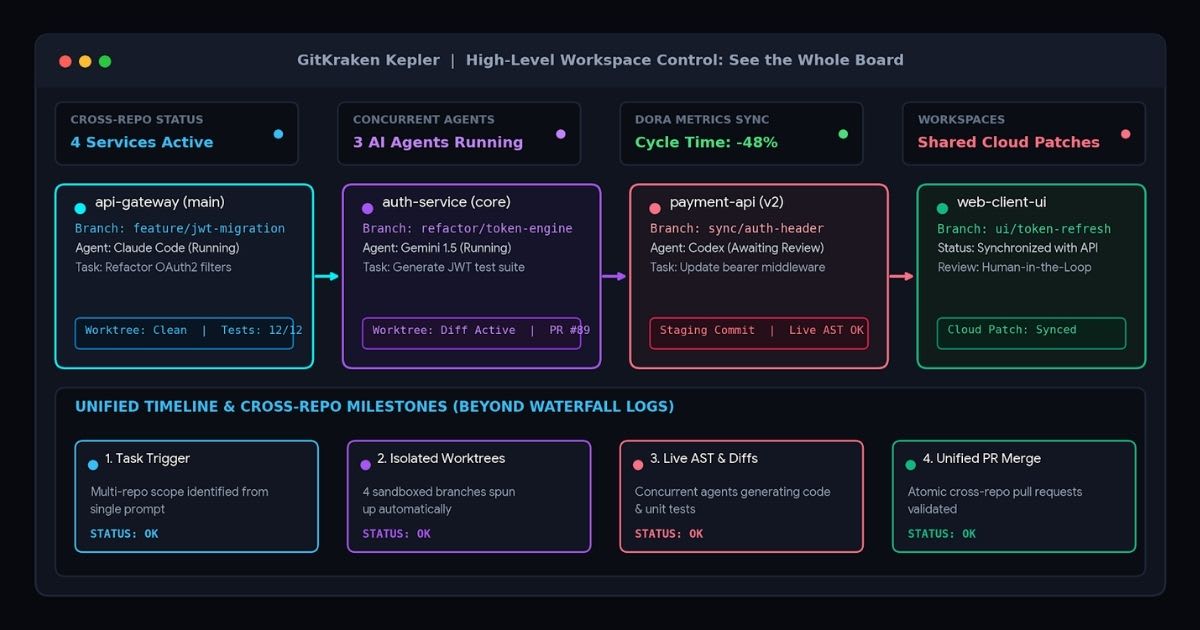
GitKraken Kepler gives team leads a bird's-eye view across every service.
You can see active agents on one visual board. The app shows clear branch
visualization maps, a live branch graph, and active tasks. Teams fix
blockers quickly with smart branch management. Context loss stops when
you use GitKraken Kepler for microservices. The board links docs,
issues, and code changes in one view. Engineers can trace bugs through
deep repository history and a live code diff. This clear view
keeps code quality high across large remote projects.
Multi-Repo
Orchestration Without Context Fragmentation
Working
across many services can break normal code editors. Kepler keeps the big
picture alive using Shared Workspaces and Cloud Patches. It stops
small changes from breaking other repos during Git collaboration.
Real-Time
Visibility: Why We Stopped Reading Agent Logs Like a Waterfall
Reading
long text logs wastes precious time. Clear commit visualization screens
turn raw agent text into simple steps. Developers can audit code changes
quickly with a clean commit graph and accurate commit history.
Live Progress
Tracking Across Microservices and Distributed Repos
Kepler
tracks parallel jobs across many codebases. It spots merge bugs, dependency
issues, and broken tests early to boost team collaboration and developer
experience across distributed teams.
GitKraken Desktop Integration: Deep Single-Repo Agent Sessions
Pairing
GitKraken Kepler with GitKraken Desktop gives you deep visual
control. Developers can watch active agent sessions right on the famous commit
graph. You see where the agent branches, what it stages, and what it
writes. This makes agent work clear and safe using great software
development tools. Safety is key when running AI, and GitKraken Kepler
keeps your code secure. You can review edits in the live diff before any
code gets saved. If the tool writes bad AI-generated code, you can undo
it with one click. This keeps your local repository clean and your Git
workflow safe.
|
Feature Layer |
Standard AI Tools |
GitKraken Kepler ADE |
|
Workspace Scope |
Single file or single folder |
Unified multi-repo workspaces |
|
Git Integration |
Detached terminal patches |
Native visual commit graph
& worktree |
|
Model Support |
Single proprietary vendor |
Multi-agent (Claude Code, Gemini,
etc.) |
|
Error Handling |
Blind re-prompting |
Interactive live diff with
1-click rollback |
|
Team Sync |
Manual branch pushing |
Integrated Cloud Patches
& Shared Workspaces |
What Are Agent
Sessions in GitKraken Desktop?
Agent
sessions are safe sandbox spaces for specific code tasks. They use an isolated worktree
and automatic worktree detection. This keeps your main branch safe while
the agent builds new features in desktop development.
Catching an Agent
in the Act: Interactive Diffs and Guardrails
Developers
can watch live code changes as the model types. You can pause work,
check the code diff, or reject bad edits. This keeps bad code out of
your project and protects your developer workflow.
Preserving the
Visual Commit Graph and Merge Conflict Safety
The
visual Git graph shows every automated step. It makes Git merging
easy and prevents lost code. Your project history stays clean and readable
during normal Git branching cycles.
The Complete GitKraken Dev Suite: CLI, Browser Extension, and Desktop
Using
GitKraken Kepler with the full suite creates a smooth setup. Command
line fans use GitKraken CLI to trigger agents with short text commands.
Teammates who review PRs use the browser extension on GitHub or GitLab.
Built-in Git collaboration services keep everyone on the same page. Large
engineering teams use GitKraken Kepler with GitKraken Dev Services
to standardize work. Features like Shared Workspaces and Cloud
Patches let teams share work in progress easily. This connects desktop,
terminal, and web tools into one system. It helps distributed teams and engineering
teams ship code faster.
GitKraken CLI:
Terminal-First Workflows for Agent Command Triggers
The fast command-line Git interface gives you instant access to agent tasks. You can run refactors with short inputs using terminal-based coding agents on the command line. This keeps your terminal fast while making deep changes.
Browser Extension:
Bringing Git and Kepler Context to GitHub/GitLab
The
browser tool puts repo stats right on your pull request screens. It adds GitHub
integration, GitLab integration, and web development tools to
your reviews. Reviewers check agent notes, tests, and branch trees inside their
browser.
Unified
Collaboration Services for Distributed Engineering Teams
Teams
share live code states without sending manual patch files. Built-in Git
collaboration tools help junior devs, team leads, and architects
talk easily. This shared view speeds up pull request approvals and aids developer
collaboration.
GitKraken Kepler vs. Traditional AI Coding Tools (Cursor, Copilot &
Devin)
Picking
GitKraken Kepler over old tools gives you better control across many
repos. Old assistants only finish lines inside one open file. They help with
syntax, but they lack repo context and automated branch management.
Kepler works as a true ADE, running full tasks across many codebases with
autonomous coding agents.
Traditional IDE Assistants (Cursor / Copilot):
[User Prompt] -> [In-File Autocomplete] -> [Manual Git
Add/Commit] -> [Manual PR]
GitKraken Kepler (ADE Workflow):
[User Task] ->
[Multi-Repo Orchestration] -> [Agent Client Protocol]
| |
v v
[Worktree
Sandbox] [Live Diff & DORA
Check]
| |
+-----> [Auto Commit & Cloud Patch PR]
Teams
switch to GitKraken Kepler to avoid closed ecosystems. Kepler lets you
swap between different AI models as new ones come out. It also works with your
local Git GUI to follow your team's commit rules. You get fast AI power
while keeping total control over your development environments and Git
productivity.
Comparative
Matrix: ADE Autonomy vs. In-Line Code Autocompletion
Autocomplete
tools need human input for every line. Kepler runs full multi-step tasks on its
own to raise Git productivity and speed up AI-assisted coding. It
creates files, updates packages, and runs test suites.
Local Git Graph
Context vs. Cloud-Only Black Box Runtimes
Cloud
bots run inside hidden servers that hide their steps. Kepler runs on your local
worktrees with full visibility via GitLens and deep IDE integration.
You keep full control over your private code.
Multi-Repo
Synchronization vs. Single-Folder Scopes
Basic
AI tools only look at one folder at a time. Kepler updates backend APIs,
libraries, and frontend apps together. This broad view stops bugs and improves
your GitHub workflow and GitLab workflow.
Business Impact: Measuring Engineering Velocity and SEI Metrics in 2026
Using
GitKraken Kepler brings clear gains to delivery speed and team output.
Managers track team metrics with built-in DORA Insights to measure real
cycle time drops. AI agents handle small bug fixes, package updates, and basic
test writing. This lets engineering teams focus on big features that
grow the business. Teams using GitKraken Kepler build better code with
less stress. The tool writes routine boilerplate code so senior devs can focus
on architecture and safety. Standard rules ensure clean staging and
committing across squads. This improves the developer experience,
boosts team collaboration, and keeps top talent happy.
GitKraken
Insights: Quantifying True Developer Velocity
Analytics
dashboards track closed issues, review times, and merge speeds. Managers find
bottlenecks easily using GitKraken Client tools and modern software
development tools. This data helps guide better choices across all software
teams.
6 Things to Know
Before Choosing an SEI Platform in 2026
Modern
engineering platforms must track agent tasks alongside human commits. They must
check automated tests, code quality, and repo links. Full oversight keeps your
code base healthy across your Azure DevOps workflow or Bitbucket
workflow.
Slashing Tech Debt
and Cycle Times Across Enterprise Teams
Automated
maintenance removes old tech debt systematically. Agents refactor old code,
update old libraries, and add unit tests using smart productivity tools
and mobile developer tools. This keeps enterprise code modern, fast, and
safe.
Step-by-Step Guide: How to Setup and Run Your First Task in Kepler
Setting
up GitKraken Kepler takes only a few quick steps. First, make sure you
have Git and your favorite code editor installed. Connect your project
repositories using the simple setup guide. The tool finds your branches and
local settings automatically. You are now ready to run your first automated
coding task.
- Connect
Version Control Providers: Open the setup panel and log in to your code hosting
accounts. Kepler supports GitHub integration, GitLab integration,
Bitbucket integration, and Azure DevOps out of the box.
Connecting accounts lets the app read issues and update branches safely.
- Configure
Workspace and Agent Parameters: Pick your active repos to make a workspace with Shared
Workspaces. Choose models like Claude Code or Gemini,
and set token caps. Turn on worktree detection so tasks run in
safe, isolated branch copies.
- Launch,
Inspect, and Merge the Task: Type a clear prompt that describes the bug fix or
feature. Watch the agent write code and check changes in the code diff
viewer. When tests pass, approve the work to run Git push, handle Git
staging, and finalize Git commits.
Best Practices for Reviewing Agent-Generated Code and Security Risks
Using
GitKraken Kepler safely means having clear review rules for AI-generated
code. Never merge AI code without manual checks and automated tests. Use Focus
Views to isolate updated code and check edge cases. Good review habits
prevent bugs and keep production apps stable. Security in GitKraken Kepler
relies on sandbox isolation. Keep private API keys, database passwords, and
secrets out of agent reach. Set branch rules that require peer reviews on all
agent pull requests. Mixing AI speed with human checks builds a safe code
review workflow.
What to Look for
in Code Review Platforms for Agentic Code
Review
tools must show the original prompt next to the final diff. Reviewers can check
the original plan against the actual code during code verification and code
review. This clear view makes reviews fast and catches logic bugs early.
Sandboxing Agent
Changes and Preventing Secret Exfiltration
Run
autonomous jobs inside isolated worktrees or local containers. Block
unnecessary web access during code runs in your Git client to protect repository
management. This stops data leaks and keeps company code safe.
Human-in-the-Loop
Quality Assurance and Test Automation
Always
pair AI code generation with unit tests and integration tests. Human engineers
must check code structure and business rules during code review and code
verification. This team approach keeps software quality high.
Industry Expert Insights
Frequently asked questions
What is the purpose of GitKraken?+
GitKraken provides a visual interface for Git version control. It helps developers manage branches, resolve merge conflicts, and track code history without relying entirely on complex terminal commands.
Is GitKraken safe to use?+
Yes, GitKraken is completely safe and enterprise-ready. It works directly with your local repositories, uses secure SSH/OAuth credentials, and does not store or claim ownership of your proprietary code.
What is the difference between GitHub and GitKraken?+
GitHub is a cloud hosting platform where your remote code, pull requests, and CI/CD pipelines live. GitKraken is a visual desktop client used on your computer to interact with, edit, and manage that code.
How much does GitKraken cost?+
GitKraken is free for public open-source repositories. Paid plans for private repos and team collaboration start around $4.95 to $6.00 per user per month, with enterprise tiers scaling higher for custom security features.
Why are people moving away from GitHub?+
Developers move to platforms like GitLab or Codeberg to avoid Microsoft vendor lock-in, gain self-hosting freedom, and address data privacy concerns regarding how AI models train on code.
Is GitKraken a good tool?+
Yes, GitKraken is an excellent tool for visualizing complex Git branch trees and resolving painful merge conflicts quickly. However, it requires a paid license for private repos and uses more system RAM than the native command line.
Related articles
 AI Coding Tools
Best AI coding assistants for beginners
Learning to code with AI? These assistants teach instead of just autocompleting.
 AI Coding Tools
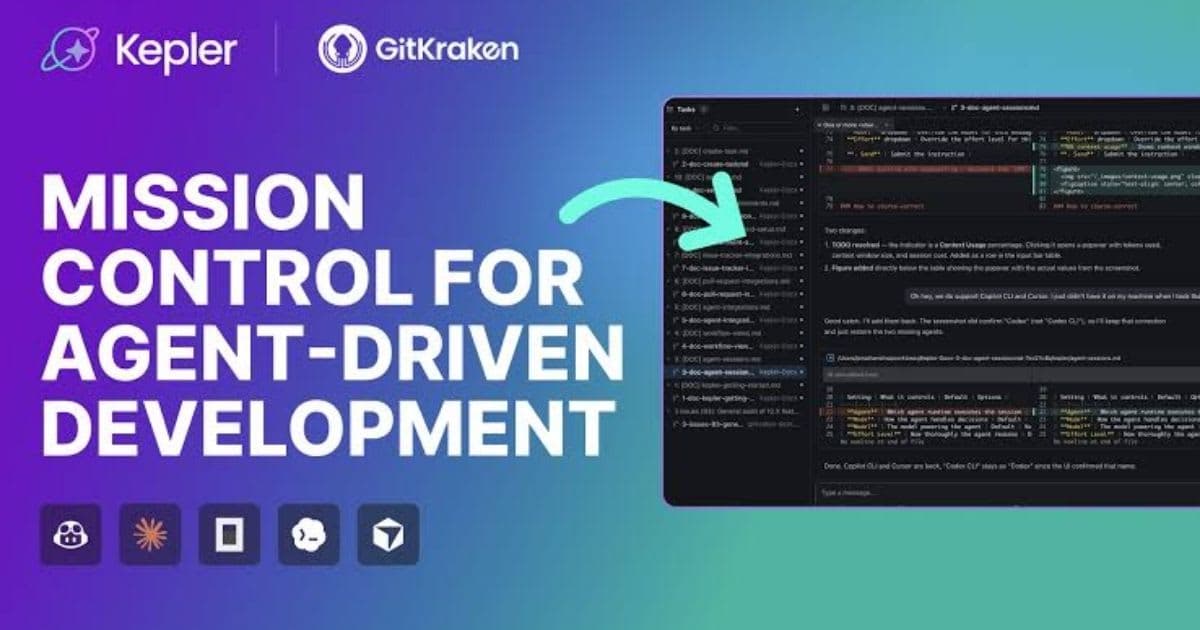
Kepler AI Coding: The Best AI Coding Workflow with GitKraken Kepler in 2026
Master Kepler AI coding to run parallel agents, automate multi-repo workflows, and ship clean, merge-ready pull requests faster.
 AI Coding Tools
How GitHub AI Code Review Works: Complete 2026 Developer Guide
Master GitHub AI code review in 2026. Automate pull request triage, detect critical bugs instantly, and slash review turnaround.
New AI tool reviews, in your inbox.
Get new reviews and comparisons in your inbox. No spam, unsubscribe anytime.
Comments (0)
Be the first to comment.