How to Write AI Image Prompts That Actually Work: Ultimate Guide
Write AI image prompts that actually work. Learn proven formulas, styles, modifiers, and tips to create better AI images in 2026.
Introduction
Strong AI visuals start with clear instructions, not luck. Learning to write
AI image prompts that actually work now shapes social posts, ads,
blog graphics, and full creative campaigns. Getting a polished result
still depends on how clearly you describe your idea. A good prompt structure
gives the model direction without burying it under noise.
You do not need technical skills to start writing better prompts. Modern image
generators understand plain language and detailed creative direction.
OpenAI recommends focusing on purpose, subject, setting, style, and
constraints. Midjourney stresses clear subject description, medium,
lighting, color, mood, and composition.
10 AI Image Prompt Examples for Different Use Cases
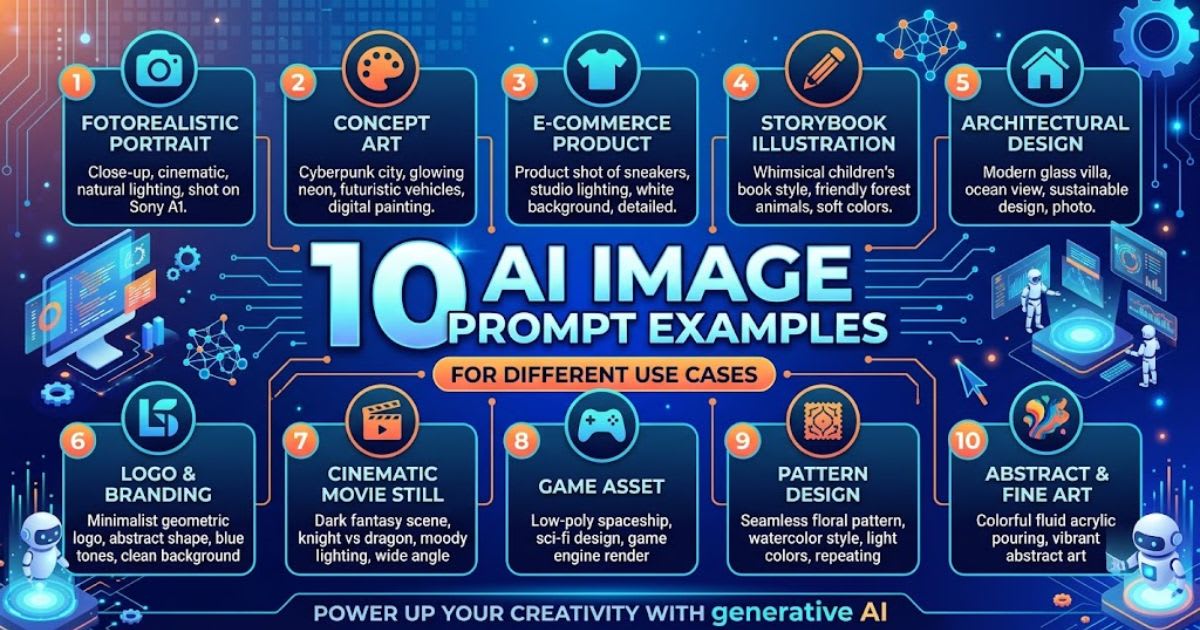
Examples make prompt writing easier because you see ingredients
working together. These ready-to-use templates cover common creative
tasks without locking you into one generator. Swap the subject, setting,
colors, and visual style to build your own variations from any single
template below.
|
Use Case |
Example Prompt |
|
Professional headshot |
Confident young business
professional, tailored navy blazer, clean studio background, soft
window-style lighting, natural skin texture, centered composition. |
|
Product shot |
Premium wireless headphones on
polished dark surface, subtle reflections, controlled studio lighting, sharp
materials and realistic details. |
|
Cinematic portrait |
Thoughtful young man beside a
rain-covered window at night, soft blue ambient light, warm practical light
behind him, shallow depth of field. |
|
Children's illustration |
Friendly woodland scene with a
curious child beside a small stream, warm watercolor textures, soft sunlight,
playful storybook composition. |
|
Fantasy landscape |
Massive mountain valley beneath
glowing clouds, ancient stone bridge crossing a river, atmospheric mist,
dramatic natural light. |
|
Food photography |
Fresh gourmet burger on a ceramic
plate, crisp ingredients and detailed textures, warm restaurant lighting,
shallow depth of field. |
|
Anime character |
Young futuristic explorer in a
sleek utility jacket, neon-lit research station, expressive face, dynamic
perspective, atmospheric lighting. |
|
Logo concept |
Minimal geometric logo for a
modern technology brand, clean shapes, balanced negative space, black and
white presentation. |
|
Editorial fashion |
Confident model in structured
neutral clothing, minimalist architectural setting, controlled studio lighting,
premium magazine photography. |
|
Sci-fi scene |
Advanced research laboratory on a
distant planet, scientists examining a glowing interface, subtle atmospheric
haze, cinematic lighting. |
What Is an AI Image Prompt and How Does It Work?
An
AI image prompt is written instruction that tells a generator what to create.
It can describe a person, product, environment, artistic treatment, lighting setup, or visual mood. Think of it as a creative brief compressed into everyday language. Clearer
instructions make it easier for the model to produce a useful visual. Modern
tools also accept reference images
instead of text alone. You could upload a product photo and request new
lighting or a different background.
Midjourney supports image prompts that influence content, composition, colors,
and visual style. This
flexibility goes beyond simple text-to-picture
creation.
Text-to-Image vs. Image-to-Image Generation
Text-to-image
builds a visual entirely from written instructions. Image-to-image generation
starts with an existing picture and reshapes it using your directions.
You could turn a basic product photo into a polished advertising scene
this way. Reference images help establish composition, appearance, or
overall direction. Both methods rely on the same core skill: precise prompt
writing. Text-to-image demands a complete scene description since
nothing exists yet. Image-to-image needs targeted instructions that explain
exactly what should change. Knowing which method fits your project saves time
and avoids wasted generations.
Why Do AI Image Prompts Fail?
Vague instructions cause most failed generations. Saying "make a
beautiful business image" leaves too many decisions to the model. You
never explained the subject description, setting, lighting, or intended visual
style. The output may look nice while still being wrong for your project.
Overloading a single prompt also causes trouble. More words do not
automatically improve image generation results. Midjourney recommends
short, clear descriptions instead of long, competing lists. Avoid vague
subjects, contradictory instructions, unnecessary adjectives, and five
competing styles crammed into one line.
The 7-Part AI Image Prompt Formula
A
repeatable structure removes guesswork from every prompt you write. Use
this formula: Subject, Action, Setting, Style, Composition, Lighting,
and Details. You will not need every element for each project. This prompt
framework simply helps you spot missing information before you
generate anything. Compare "a professional woman at work" with a fuller
version. A stronger prompt reads: "A confident marketing professional
reviewing campaign data at a modern desk, realistic editorial photography,
medium shot, soft window light, natural skin texture." The second version
gives the model a clear visual target.
Subject
Start with the most important element in your scene. Describe who
or what should dominate the frame using age, clothing, material, or
color details. Exact numbers work better than vague plurals.
Midjourney recommends specific quantities whenever the count of objects
genuinely matters to the result.
Action and Context
Explain what the subject does and why the scene exists. "A chef
preparing dinner" gives more direction than just "a chef." Add environmental
context too. Describe whether the chef works inside a busy restaurant
kitchen or a quiet home kitchen for a completely different visual mood.
Style
Pick a visual language that fits your purpose. Options include
realistic photography, editorial imagery, watercolor, 3D rendering, or cinematic
artwork. Specific medium terms strongly shape the final look. Midjourney's
current guidance highlights artistic mediums as one of the most reliable
creative controls available today.
Composition
Composition decides how viewers experience the subject. Mention close-up,
medium shot, wide shot, overhead view, or centered framing when it matters.
If the image becomes a website banner, specify that layout requirement
directly. This step prevents a strong image from becoming awkward inside
your design.
Lighting and Color
Lighting changes the
emotional character of any image instantly. Try soft window light, dramatic
side lighting, warm golden-hour glow, or cool studio lighting. You
can also describe a restrained color palette or vibrant, monochrome, and
muted tones depending on the mood you want the scene to carry.
Mood
Mood tells the generator how the image should feel overall. A
cheerful family scene needs different choices than a tense thriller poster.
Words like calm, energetic, mysterious, luxurious, nostalgic, or dramatic establish
emotional direction fast. You rarely need a lengthy explanation once the
right mood word appears.
Quality and Details
Finish
with the details that genuinely matter to your final result. Mention realistic
materials, crisp product edges, natural skin texture, or fine fabric
detail. Avoid stacking meaningless quality terms into your prompt. A precise
description usually beats repeatedly writing "ultra-high-quality"
without any real specifics.
How to Write AI Image Prompts That Actually Work:
Step by Step
Learning
how to write AI image prompts that actually work starts with a simple
sequence. Begin with your core idea instead of chasing a perfect sentence
immediately. State the subject first, then add setting, action, and prompt
structure. Only include details that genuinely influence the final result. Next,
inspect your first result carefully before making changes. Ask what
actually went wrong rather than saying "make it better." Maybe the
subject looks right but the background feels crowded. OpenAI recommends
small, targeted revisions instead of changing every variable
inside the prompt at once.
Use Clear Visual Language
Replace
abstract phrases with things the model can actually visualize.
"Make it premium" stays vague and unhelpful for any generator.
"Minimal black packaging on polished stone with soft studio
lighting" gives a concrete direction. Descriptive language
works best when it names something a viewer could see.
Add Spatial Relationships
Spatial language helps whenever several objects share one scene together. Specify whether an object sits in the foreground, background, or a specific side. When using multiple reference images, OpenAI recommends explaining how those references relate to each other, which avoids confused or blended results.
Keep Important Instructions Together
Place
your most important requirement near the center of the prompt. If
an object, headline, pose, or composition must stay unchanged, state that
clearly. For image editing, direct constraints such as "change
only the background" make the requested transformation far easier for the
model to follow.
AI Image Prompt Styles and Modifiers That Actually
Work
Modifiers
narrow your visual direction without writing an enormous description. Photography
modifiers define camera behavior and lighting choices. Illustration
modifiers establish medium and texture. Cinematic terms shape atmosphere,
framing, and contrast. Adobe's Firefly guidance also recommends descriptive
prompts with clear subjects and useful descriptors. Modifiers work
best when they support one central idea. Adding ten style labels at once
creates conflicting signals inside the generation. Choose a small,
cohesive group that belongs together, like "editorial photography,
soft natural light, shallow depth of field," instead of mixing unrelated
artistic mediums together.
Photography Modifiers
Useful
terms include portrait photography, studio lighting, shallow depth of
field, and natural window light. Wide-angle perspective, telephoto
compression, soft shadows, and realistic skin texture also help. Adobe
demonstrates how lens and aperture terminology shapes photographic
results directly inside Firefly's prompt system.
Illustration Modifiers
For
illustrated visuals, try watercolor, pencil sketch, ink drawing, or vector
vector art. Textured digital painting and hand-drawn linework also work
well for stylized projects. Describing texture helps too — "visible paper
grain and delicate brush texture" gives the generator a more tangible
artistic direction.
Cinematic Modifiers
Cinematic
prompts benefit from dramatic framing, atmospheric depth, and controlled
contrast. Practical lighting, widescreen composition, subtle film grain, and moody
shadows round out the look. Use these terms selectively so your goal stays
a consistent visual atmosphere rather than a pile of fashionable
adjectives.
How to Control Composition, Camera, Lighting, and
Mood
Composition
matters most whenever an image serves a practical purpose. A blog hero image
may need open space reserved for a headline. A product advertisement usually
needs centered positioning. A social graphic may require portrait
orientation. State these requirements instead of hoping layout happens
automatically. Camera direction makes an ordinary scene feel intentional and
considered. Try close-up framing for facial detail or a wide shot for environmental
storytelling. Lighting then reinforces your message — soft light feels
approachable, while harder directional light can create tension, depth, and a
stronger visual mood.
Choose the Right Aspect Ratio
Your
final destination should shape composition from the very beginning. A website
banner needs different framing than a vertical social graphic. Some
generators offer dedicated aspect-ratio controls, while others interpret
dimensions through plain language, and Midjourney currently provides these
controls through direct parameters.
Negative Prompts and Common AI Image Problems
Negative prompting helps only when your generator supports explicit
exclusions directly. Writing "no mistakes" will not automatically
prevent mistakes from appearing. Midjourney advises describing what you want
rather than relying on negative wording. It provides dedicated
parameters built specifically for excluding unwanted elements. Instead of
dumping unwanted objects into every prompt, identify the actual recurring
problem. If clutter keeps appearing, request a clean minimal background
directly. If unwanted text shows up, specify no additional text where the
generator allows that constraint, which keeps every instruction focused and
useful.
Fixing Hands, Faces, and Distorted Details
Small
anatomical errors still appear in generated visuals sometimes. Inspect
hands, eyes, teeth, jewelry, repeated objects, and fine lettering before
publishing anything. If one area looks wrong, use a targeted editing feature
instead of regenerating the entire scene, which preserves everything that
already works.
Getting Better Text Inside Images
Text
generation has improved, yet exact wording still needs extra attention.
Keep headlines short and specify placement, formatting, and exact spelling
clearly. OpenAI recommends clear instructions for text placement, while
Midjourney supports quoted text directly inside prompts for more predictable
image generation results.
How to Improve AI Images Through Prompt Iteration
Treat
your first generation as a draft, never a final answer. Start with the core
scene, then make one focused change at a time. Ask for brighter
lighting, a cleaner background, or a stronger subject position. OpenAI
recommends targeted revisions because they stay far easier to control. Keep
successful prompts inside a personal prompt library for future projects.
Save exact wording alongside the model, settings, aspect ratio, and final
result. Over time, this becomes your own collection of reusable prompts,
so you spend less time guessing and more time adapting proven prompt
structure.
Change One Variable at a Time
Suppose
your first result nails the subject but shows weak lighting. Change only
the lighting description in your next attempt. Altering composition, clothing,
background, and style together removes any clear signal. Controlled
iteration works like a simple experiment, where one change reveals one
clear answer.
Use Reference Images Strategically
Reference
images communicate details that words often struggle to capture. Use them for
composition, color direction, character appearance, or product shape.
Midjourney supports image prompts and multiple reference approaches for
influencing new generations, blending visual style guidance with your
written instructions smoothly.
Save Your Successful Settings
A
strong prompt becomes more valuable once you can reproduce its look.
Record the generator, model, aspect ratio, references, and important wording
used. Some platforms offer seed or variation controls for further
testing, and Midjourney describes seeds as useful for measuring how prompt
changes affect results.
Best AI Image Prompt Practices for 2026
The
best approach in 2026 avoids writing the longest possible instruction. If you
want to write AI image prompts that actually work, focus on
communicating visual intent with real precision instead. Current
guidance from leading platforms consistently favors clear descriptions,
relevant details, references, composition choices, and steady iterative
refinement. Choose your generator based on the task rather than forcing
every project through one tool. ChatGPT Images supports generation and
editing through natural language. Midjourney offers parameters, references,
and editing workflows. Adobe Firefly provides prompt controls
built around reference-based creative production.
Match the Model to the Job
A
photorealistic product campaign needs different capabilities than an experimental
illustration project. Test your preferred generator using a small sample
before committing to bigger work. Compare subject accuracy, typography,
composition, editing control, and workflow speed rather than judging any
tool from one lucky result.
Review Before Publishing
Never
assume an image is ready just because it looks convincing. Check faces, hands,
text, logos, product details, shadows, and unexpected objects carefully.
For commercial work, review permissions and likeness concerns tied to
your chosen platform, since responsible review protects both quality and
credibility.
Final Thoughts on Writing Better AI Image Prompts
Creating
strong visuals depends on clear communication, not secret phrases. Knowing
how to write AI image prompts that actually work starts with the
subject, context, and style. Then control composition, lighting, and mood
before refining weak areas instead of discarding a promising result
entirely. Treat prompting as a practical creative skill you build over
time. You improve by testing, comparing, and saving successful prompt
structure choices as you go. With the right process, thoughtful AI image
prompts turn a rough idea into a polished visual that actually
serves your project.
Frequently asked questions
10 AI Image Prompt Examples for Different Use Cases+
Follow a clear structure: subject, action, style, composition, lighting, detail. State the subject first, add only details that matter, then make one targeted revision at a time.
How to make AI images look real prompt?+
Specify realistic materials, natural skin texture, and accurate lighting instead of vague quality words. "Realistic editorial photography, soft window light, natural skin texture, shallow depth of field" beats "ultra-realistic, 8k, highly detailed.
Is there a 100% free AI image generator?+
Yeh tool-pricing sawaal hai, article ke scope se bahar, aur pricing/limits frequently change hote hain — main isay bina verify kiye confirm nahi kar sakta.
What are some trending AI photo prompts?+
Trending" time-sensitive claim hai jo current data maangta hai — mera knowledge yahan outdated ho sakta hai, is liye guess nahi karunga.
What is the best way to write AI prompts?+
Follow a clear structure: subject, action, setting, style, composition, lighting, detail. State the subject first, then add only the details that change the result. Review each output and make one targeted revision at a time.
Related articles
 Guides & Tutorials
Answer AI Extension Guide (2026): Free Limits and Safety
Discover how the Answer AI extension works, its free features, accuracy, subscription costs, and the best alternatives for your needs.
 Guides & Tutorials
Best AI Tools for Data Analysis in 2026: Needs and Costs
Best AI tools for data analysis: compare ten tools, real prices, hidden setup rules, and how to check AI results before you share.
 Guides & Tutorials
Best AI Tools Directories in 2026 (Compared and Explained)
Find the best AI tools directories in 2026. Compare the 9 top sites, spot paid listings, and learn how to submit your own AI tool.
New AI tool reviews, in your inbox.
Get new reviews and comparisons in your inbox. No spam, unsubscribe anytime.
Comments (0)
Be the first to comment.