The 9 Best AI Writing Tools in 2026, Ranked & Compared
Nine AI writing tools compared on real 2026 pricing, model line-ups and who each one actually suits — from $0 free tiers to $299/month SEO platforms.

Introduction
Among the best AI writing tools ChatGPT suits everyday drafting, Claude suits long-form work, and Jasper suits marketing teams needing a brand voice. Grammarly is strong for editing, Sudowrite focuses on fiction, Surfer SEO on search optimisation, and Rytr is a budget starting point.
In the last 18 months, general assistants have absorbed the old AI copywriting category. Surviving specialists went deep, not broad — into fiction, SEO, brand governance, and AI-search visibility. That is why this list of the best AI writing tools mixes a $9-a-month writer with a $299-a-month platform.
This is a researched ranking based on current public pricing, documentation, and 2026 announcements — not a lab benchmark. It judges fit and shortcomings.
Quick verdict: the best AI writing tools at a glance
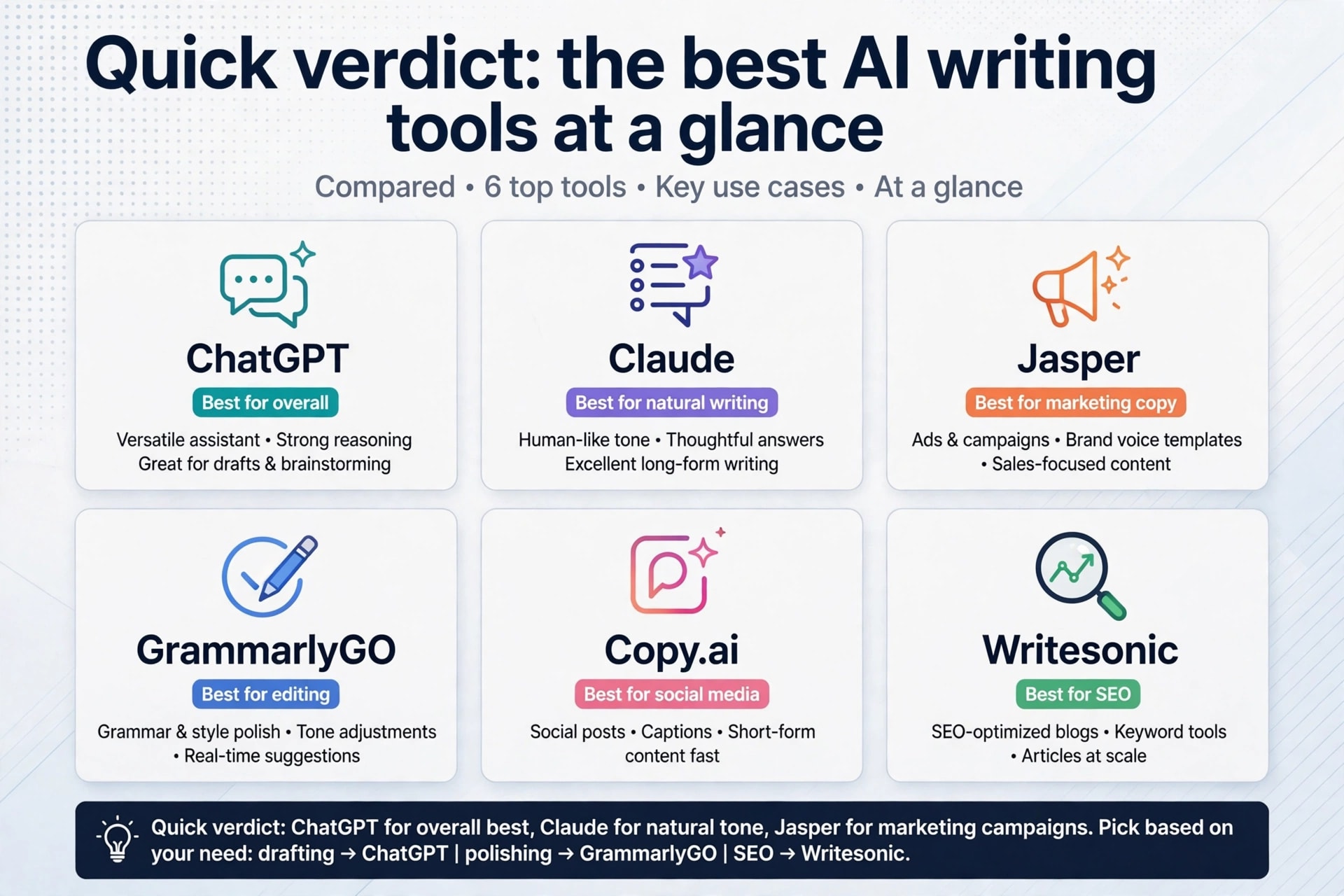
· Best
overall: ChatGPT — the widest range of writing jobs handled
competently in one place, with a free tier you can actually work in.
· Best free: ChatGPT's
free plan for drafting; Grammarly Free if you mainly need a second pair of eyes
on writing you have already done.
· Best value:
Rytr Unlimited at $9/month (monthly billing) for short-form output, or Claude
Pro at $20/month (monthly billing) if you write anything longer than a page.
·
Best for
teams: Jasper, if brand voice consistency across several writers is
the actual problem you are paying to solve.
· Best for
novelists: Sudowrite, from $10/month on annual billing ($19/month on
monthly billing).
AI writing tools compared: price and best use case
| Tool | Entry price | Free tier | Best use case |
|---|---|---|---|
| ChatGPT | $20/mo (Plus) | Yes | Everyday all-round drafting and editing |
| Claude | $20/mo (Pro), $17/mo annual | Yes | Long documents, reports, nuanced tone |
| Jasper | $59/mo annual, $69/mo monthly | No (7-day trial) | Marketing teams needing brand voice at scale |
| Grammarly | $12/mo annual (Pro) | Yes | Editing, proofreading and tone correction |
| Surfer SEO | $49/mo annual (Discovery) | No | Optimising articles for search and AI answers |
| Sudowrite | $10/mo annual (Hobby & Student) | No (free trial) | Novels, short fiction and screenwriting |
| Notion AI | $20/user/mo annual (Business) | AI trial only | Writing inside a team's existing workspace |
| Writesonic | $79/mo annual (Starter) | No (free trial) | Tracking and fixing brand visibility in AI search |
| Rytr | $9/mo (Unlimited), $7.50/mo annual | Yes | Cheap, fast short-form copy |
How we ranked these tools
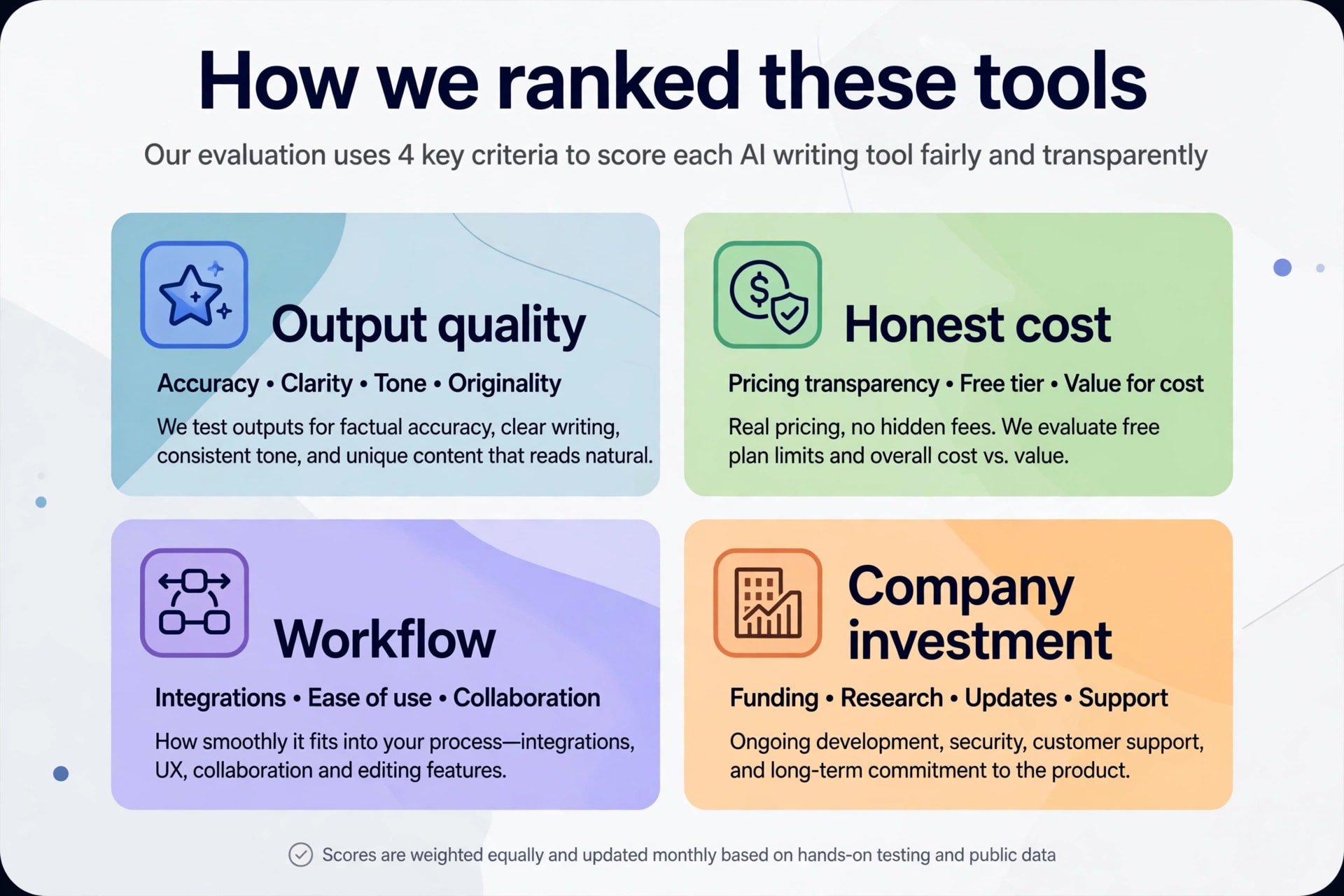
Four things
decided this order. First is output quality for the job the tool claims. Second
is honest cost at the tier you would really buy. Third is how much workflow the
tool removes for you. Fourth is whether the company still invests in the
product. This last point matters more now than before. Several 2023-era writing
tools have quietly moved away from writing.
This is a
researched, editorial ranking, not a lab benchmark. It is based on public
pricing, documentation, and 2026 announcements.
Prices below are the vendors' own published figures. Prices checked: 25 October 2026.
Prices are per user or seat, unless stated otherwise. Annual billing is usually cheaper per month than monthly billing. But the saving varies a lot by tool. Check the table for each tool instead of assuming one discount. Annual plans usually bill the full year upfront.
The 9 best AI writing tools in 2026, reviewed
ChatGPT — best overall
ChatGPT
remains the default because it collapses the most steps: research, outline,
draft, rewrite, shorten, reformat, all in one thread. OpenAI's pricing page
currently lists four consumer tiers — Free, Go, Plus and Pro — with unlimited
everyday text chats on Luna even for free users. Plus and Pro add Sol, and Pro
alone unlocks Sol Pro for heavier reasoning work. Terra is available in
Work/Codex, with limited access on Free and Go.
Pricing
runs $8/month for Go, $20/month for Plus, and $100, $200 or $500/month for the
three Pro tiers. Prices are US list prices before tax, checked October 2026.
For most writers, Plus is the sweet spot.
Pros: one of the strongest free tiers of
any general assistant; handles almost every writing format; enormous ecosystem
of prompts and integrations; strong at reformatting and repurposing.
Cons: a recognisable house voice
that editors have learned to spot; drifts on very long documents; no built-in
brand-voice governance or SEO scoring; you will spend real time on prompting.
If your output feels generic, the fix is almost always prompt structure rather than a different tool. Our guide on how to write effective AI prompts covers the patterns that help most.
Claude — best for long-form writing
Claude is
what to reach for when the document is long and the tone actually matters:
white papers, reports, sales pages, book chapters, dense edits. Anthropic's
current flagship models offer up to a 1-million-token context window. In
practice means you can drop an entire draft in and ask for a structural rewrite
rather than feeding it section by section. The exact window depends on the
model you choose, not just the plan.
The free
plan includes Sonnet and Haiku, with usage limits, but not the strongest
models. Pro is $20/month, or $17/month billed annually at $200 upfront. Max is
$100/month for 5x Pro usage, or $200/month for 20x Pro usage. Team Standard
seats run $25/month monthly or $20/month annually, and Team Premium seats run
$125/month monthly or $100/month annually.
Pros: one of the most controlled prose
styles of the mainstream assistants; excellent at editing rather than only
generating; long context makes whole-document work practical; clear, honest
usage tiers.
Cons: usage limits on Pro bite quickly
if you paste large files; no SEO scoring, publishing integrations or keyword
research; fewer third-party plugins than ChatGPT.
Choosing between the big assistants is its own decision — we break it down in ChatGPT vs Claude vs Gemini.
Jasper — best for marketing teams
Jasper is
not competing with $20 assistants on raw writing quality; it is selling
governance. Brand Voices, Knowledge assets and Audiences let a team of writers
produce copy that sounds like one company. That is a genuine problem at scale.
Pro costs
$69/month monthly or $59/month billed annually for a single seat, after a 7-day
trial. It includes 2 Brand Voices, 5 Knowledge assets and 3 Audiences. Business
is unlimited on those limits. Business is quote-only with a 12-month minimum.
Jasper's
2026 releases lean hard into AI search. Note the tier: a GEO Hub, a Translation
Agent, scheduled Grid runs, and custom agent building in Studio are
Business-tier features, not Pro features. GEO Hub tracks brand presence,
citation rates, sentiment, and competitive share of voice across ChatGPT,
Claude and Gemini.
Pros: It has one of the most mature
brand-voice toolings here. Agents and Grid genuinely automate repetitive
campaign work. It integrates strongly with Asana, Monday and Adobe Workfront.
Cons: It is expensive per seat against
general assistants. The features most teams want — API, custom agent builder
and unlimited customisation — sit behind a sales call. Pro's asset limits are
tight for anything beyond one brand.
Grammarly — best for editing and polish
Grammarly
is the one tool on this list most people should run alongside something else.
It does not want to write your article; it wants to catch the tone problem in
your email before you send it. In October 2025 the parent company rebranded
itself as Superhuman. It folded Grammarly, Coda and Superhuman Mail into one
suite, alongside a cross-app assistant called Superhuman Go. Grammarly itself
continues as a standalone product.
The free
plan covers grammar, spelling and tone detection plus 100 AI prompts a month.
Pro is $12/member/month billed annually (charged as $144 upfront) or $30/month
on monthly billing. It raises the allowance to 2,000 AI prompts a month with
plagiarism and AI-text detection. The Superhuman Business bundle sits at
$33/member/month billed annually, or $40/member/month billed monthly.
Pros: It works everywhere you already
type. Its free tier is one of the best free editing safety nets available.
Plagiarism and AI-detection checks are included on Pro.
Cons: AI prompts are metered, not
unlimited. Annual billing takes the full year upfront. Suggestions can sand the
personality out of good writing if you accept them uncritically. It is a poor
primary drafting tool.
Surfer SEO — best for search and AI-answer optimisation
Surfer does
not really write; it tells you whether what you wrote can compete. The Content
Editor scores drafts against ranking pages in real time. The 2026 roadmap
pushed hard into AI search. It added an AI Tracker for visibility in AI
answers, a unified Content Score, and Intent Alignment. An August 2026 Surfer
MCP Beta release plugs the platform into agentic workflows.
Plans
billed yearly run $49/month for Discovery, $99/month for Standard, $182/month
for Pro and $299/month for Peace of Mind. Discovery includes 120 documents per
year and 10 tracked pages. Peace of Mind includes unlimited documents, subject
to fair use, and API access. A standalone AI Search Analytics product starts at
$82/month billed yearly. There is no free plan for the main platform, though
some standalone tools like the AI detector and Chrome extension are free.
Pros: It has one of the clearest
feedback loops between a draft and its ranking chances. AI Tracker is genuinely
useful now that answer engines drive traffic. MCP support makes it usable
inside automated pipelines.
Cons: There is no free plan, and monthly
billing costs meaningfully more. Chasing the content score produces stiff,
over-stuffed prose if you take it literally. Document quotas run out faster
than you expect at the lower tiers, because the allowance is yearly, not
monthly.
Sudowrite — best for fiction
Sudowrite
is the only tool here built by people who clearly care about narrative craft.
Story Bible keeps characters, plot and world consistent across a manuscript.
The platform blends third-party models from Anthropic and OpenAI with Muse, an
in-house model trained specifically for fiction.
Hobby &
Student is $10/month billed annually ($19/month billed monthly) for 225,000
credits. Professional is $22/month billed annually ($29/month billed monthly)
for 1,000,000 credits. Max is $44/month billed annually ($59/month billed
monthly) for 2,000,000 credits. Only Max rolls unused credits over, for up to
twelve months. Unused credits on Hobby & Student and Professional expire at
the monthly refresh. Annual billing advertises up to 50% off, though the saving
varies by tier, and there is a free trial without a card.
Pros: It has purpose-built fiction
features few others match. Muse avoids much of the cliché that general models
fall into. Credit rollover on Max is unusually fair.
Cons: Credits are hard to translate into
words before you start. It is entirely wrong for business copy, email or SEO.
It is a co-writer, not an autopilot, and treating it as one shows in the
output.
Notion AI — best inside an existing workspace
Notion AI's
advantage is proximity. It writes where your notes, specs and meeting records
already live. So it answers with context a blank chat window never has. The
catch is pricing — the old $10 standalone add-on was retired, and AI is now
bundled into higher tiers instead.
Free and
Plus ($10/user/month billed annually, $12 billed monthly) get a limited AI
trial only. Business at $20/user/month on annual billing — $24 billed monthly —
is the real entry point, unlocking Notion Agent, AI Meeting Notes and
Enterprise Search. Custom Agents run on a separate meter at $10 per 1,000 monthly
credits, with no rollover.
Pros: It gives context-aware answers
drawn from your own workspace. Meeting notes and enterprise search are bundled
rather than bought separately. It is excellent for internal docs, specs and
summaries.
Cons: You must jump from $10 to $20 a
seat to get ongoing AI. Prose quality is competent rather than best-in-class.
The credit meter on Custom Agents adds a second, less predictable bill.
If meeting capture is the main draw, compare it against the dedicated options in our AI meeting note-taker comparison first.
Writesonic — best for AI search visibility teams
Writesonic
has changed job. It now markets itself as an AI search growth engine. It tracks
how brands appear across AI surfaces, then generates content and site fixes to
close the gaps. Chatsonic, once its headline chat product, no longer features
in the main positioning.
One important
tier note: the full ten-platform coverage — ChatGPT, Perplexity, Claude,
Gemini, Grok, Copilot, Meta AI, DeepSeek and Google's AI surfaces — is
Enterprise-only. Starter, Basic and Growth track three platforms: ChatGPT,
Gemini and Google AI Overviews.
Starter is
$79/month billed annually ($99 monthly). It includes 50 tracked prompts a day,
15 AI articles a month, 10 site audits and one user. Basic is $199/month
annually, Growth $399/month, and Enterprise adds all ten tracked AI platforms
plus SOC 2 Type II, HIPAA and GDPR compliance. There is no free tier, though
the 7-day trial does not require a card.
Pros: It has one of the more complete
generative engine optimisation stacks. It ties visibility tracking directly to
content production. It has a credible compliance story at the enterprise tier.
Cons: It is no longer a sensible pick if you simply want an AI writing assistant. Its entry price is high for 15 articles a month. The pivot means older tutorials and reviews describe a product that no longer exists.
Rytr
— best budget pick
Rytr is the cheapest credible option here and makes no
pretence otherwise. It is a short-form generator: product descriptions, ad
variants, captions, subject lines, bios. For a solo operator producing volume
rather than depth, that is often enough.
The free plan gives 10,000 characters a month in one language
— roughly 1,500 to 2,000 words. Unlimited removes the cap at $9/month, or
$7.50/month billed annually. Premium at $29/month ($24.16 annually) adds 35+
languages, multiple tone matches, 100 plagiarism checks a month, custom use
cases and priority support.
Pros: It has the
lowest paid entry price on this list. It offers a real free tier rather than a
trial. It is fast for repetitive short-form output. It is simple enough that
non-writers get value on day one.
Cons: Its output
quality trails the frontier assistants noticeably. It cannot sustain a long
argument. It has no SEO scoring or Jasper-style brand-voice governance. The
free tier’s character cap disappears quickly.
Tools
we left out, and why
Copy.ai, one of the original AI copywriting tools, no longer
belongs in this category. It has repositioned as a go-to-market platform for
sales operations. The cheapest self-serve tier is a $29/month Chat plan
($24/month annually) for five seats. After that, Growth jumps to $1,000/month
billed annually. Excellent for GTM workflows; the wrong purchase if you wanted
a writing assistant.
We also left out the assistants bundled into Google Workspace
and Microsoft 365. They improve fast and are effectively free if you already
pay for the suite, but they are add-ons rather than tools you would choose on
writing merit. Gemini is covered separately alongside the other ChatGPT
alternatives worth trying.
How
to choose the best AI writing tools for your workflow
Start from the bottleneck, not the feature list. Almost
everyone overbuys here, paying for SEO scoring they never open or brand voices
nobody configured.
·
You write
mostly for yourself: one $20 assistant, and nothing else. Add Grammarly
Free for a final pass.
·
You write
for a brand with several people: the problem is consistency, not
generation. That is Jasper’s case, and it is the only reason to pay $59 a seat.
·
You
publish for search: pair a general assistant for drafting with Surfer for
optimisation. Do not expect either to do the other’s job.
·
Your
traffic now comes from AI answers: you need visibility tracking, which is where
Writesonic and Jasper’s GEO Hub earn their price.
·
You write
fiction: Sudowrite, and skip the rest of this list entirely.
·
You are
spending under $10 a month: Rytr Unlimited, or run the free tiers of
ChatGPT, Claude and Grammarly together.
One more rule: never buy two tools that overlap. A $22
fiction tool plus a $20 assistant plus a $12 editor is a reasonable $54 stack
because each does something the others cannot. Two general writing platforms is
just $80 of the same thing.
The
bottom line
For most people the answer is unglamorous. Pay $20 a month
for ChatGPT or Claude, learn to prompt properly, and add a specialist only when
you can name the job it does that your assistant cannot. The best AI writing
tools in 2026 are not the ones with the longest feature list — they are the
ones that match a bottleneck you actually have. Building a wider stack? Our
roundup of 10 free AI tools for small business is the next read.
Frequently asked questions
What is the best AI writing tool in 2026?+
For general use, ChatGPT is the strongest all-rounder: it drafts, edits and reformats competently across almost every writing task, and its free tier is genuinely usable. Claude is the better pick if you regularly work with long documents, thanks to its long context. Current flagship models offer up to a 1-million-token window, and the exact window depends on the model, not just the plan. Teams needing consistent brand voice across several writers should look at Jasper instead.
Is there a free AI writing tool that is actually good?+
Yes. ChatGPT's free plan includes unlimited everyday text chats, and Claude's free plan includes Sonnet and Haiku, with usage limits, but not the strongest models. Grammarly Free covers grammar, spelling, tone detection and 100 AI prompts a month. Rytr offers 10,000 characters a month free. Running these together costs nothing and covers most solo writing needs.
Do I still need Grammarly if I already use ChatGPT or Claude?+
They solve different problems. ChatGPT and Claude are drafting tools you visit deliberately; Grammarly runs passively in your browser, email client and documents, catching mistakes and tone issues at the moment you type them. If most of your writing happens in Slack, Gmail and shared docs rather than a chat window, Grammarly still earns its place.
Will Google penalise content written with AI writing tools?+
Google's guidance targets low-value content produced primarily to manipulate rankings, not the tool used to produce it. AI-assisted writing that is accurate, original and genuinely helpful can rank normally. Unedited bulk output usually cannot, because it lacks first-hand insight and tends to repeat what already ranks. Treat AI drafts as raw material and edit them substantially before publishing.
Which AI writing tool is best for writing a novel?+
Sudowrite, without much competition. Its Story Bible keeps characters, plot threads and world details consistent across a full manuscript, and its in-house Muse model is trained specifically for fiction rather than general text. Plans start at $10 a month. General assistants can help with individual scenes, but they lose track of continuity over book-length projects.
Related articles
 AI Writing Tools
Best AI Writing Tools for Novels 2026: Draft & Dialogue
Need the best AI writing tools for novels? Compare Sudowrite, Novelcrafter, and Claude to draft chapters, build story bibles, and write dialogue.
 AI Writing Tools
Best AI Humanizer Tools in 2026: Make Human Writing Sound
Discover the best AI humanizer tools in 2026 to turn robotic AI text into natural, engaging, and human-like writing.
 AI Writing Tools
11 Best AI Copywriting Tools in 2026 (Free & Paid)
Need the best AI copywriting tools? Compare Jasper, Copy.ai, and Claude to write high-converting ads, sales emails, and landing pages in 2026.
New AI tool reviews, in your inbox.
Get new reviews and comparisons in your inbox. No spam, unsubscribe anytime.
Comments (0)
Be the first to comment.